Reconnect a cloned tree-care WordPress site before reviewing matches
A copied tree-care website can still show the old phone and tracking settings. Confirm which site is public, reconnect that exact address and test a real visit before giving the office another homeowner review list.
Steps
-
Identify the public site and the approved address Keep the production and staging hosts distinct.Check the current website connection before changing it.
Write down the public website address, any staging copy and the address currently approved in PipelineOn. Check which site the ads and Business Profile open. Have the site owner confirm which host should receive normal customer traffic.
PipelineOn's WordPress instructions say tracking stays off when the current website address does not match the approved address. Reconnect the intended site after a clone or domain change. Keep a staging copy outside the production lead-review process and check that old contact details have not survived the move.
-
Connect the exact website and verify Live status Use the official WordPress plugin and account approval.Verify tracking instead of treating activation as completion.
If the plugin is missing, install the official PipelineOn plugin. A fresh activation does not begin tracking. Open Settings, PipelineOn, choose Connect to PipelineOn and have the account owner approve the exact website shown. If already connected, inspect that saved connection first.
Return to the plugin settings and confirm Live status. When needed, use Verify tracking now through the documented test process. The screenshot shows the plugin's Connect screen. A confirmed tracking visit establishes tracking receipt, without promising that the tester will produce an identified homeowner record.
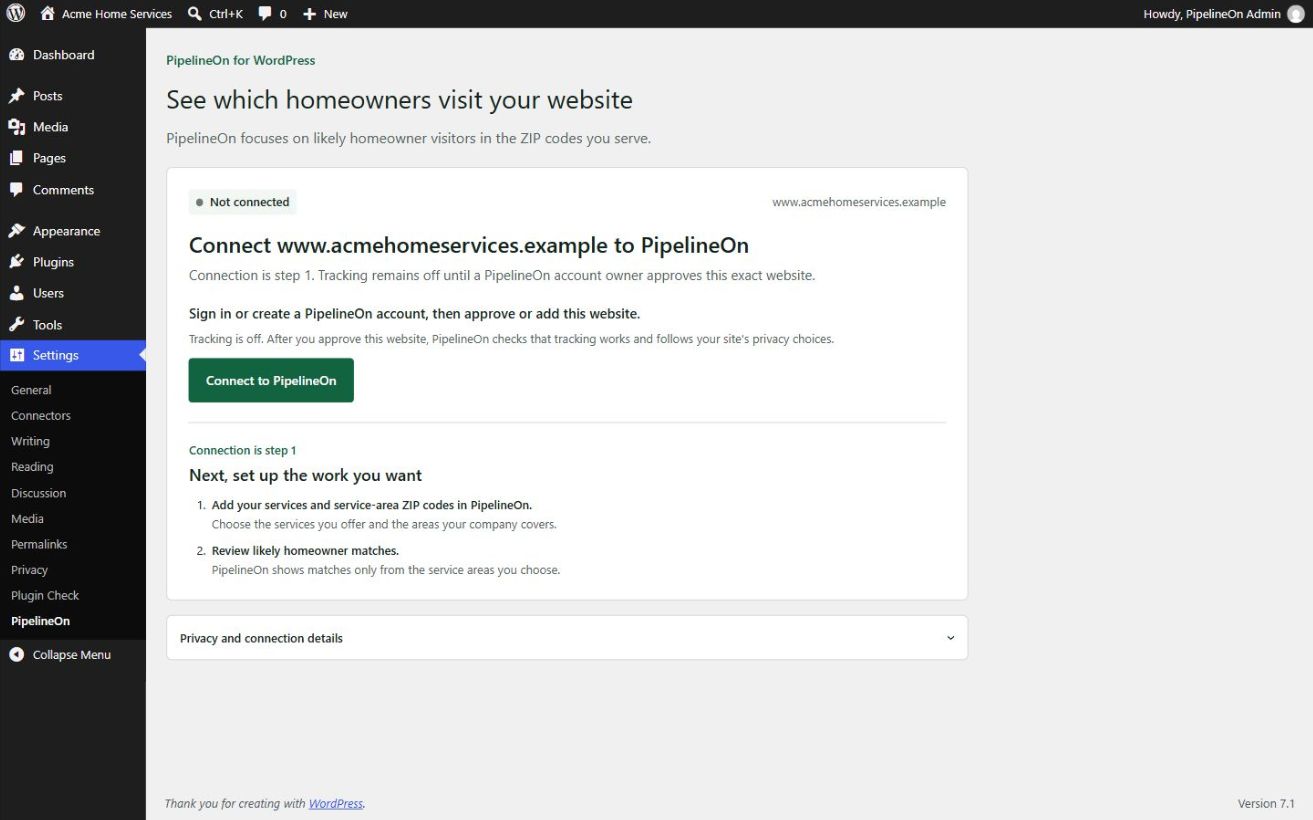
The official PipelineOn plugin’s demo Connect screen in WordPress. Source -
Recheck the arborist page, campaign URL and service ZIPs Test the actual destination from your current campaign.Confirm collection rules against the published paths.
Open a tagged campaign link for a planned tree assessment and follow its redirects. Check the final path, phone links, request form and campaign label reaching the office. Preserve the actual approved host and test the consent behavior your site requires.
Before paid collection, check the service ZIPs and page rule in the actual PipelineOn account. The product documentation says the page rule uses the page where identification is attempted. Verify that the new assessment path fits the rule. Keep urgent caller reports on your established staffed route.
-
Restart review with separate inquiry and match queues Work accepted assessment requests before additional matches.Check territory and existing arborist appointments.
Give submitted requests to the office owner responsible for arborist appointments. Review additional available homeowner matches for the actual service area and relevant page activity. Check open jobs before assigning eligible follow-up, and keep uncertain identity connections apart.
Record received requests, reviewed matches, appointments and attended assessments separately. Review the first records from the reconnected host with the site owner. If data is missing, repair tracking or field delivery before calling an empty review list a lack of demand.
What to measure
Keep the approved host, Live-status check and successful request test with the website release. Repeat them after another clone, domain change or tracking update.