Prioritize missed AC replacement calls using page evidence
A missed caller who viewed your AC replacement page gives your office a starting point. Put the call, browsing context and customer history in one review process. Confirm what the homeowner wants before routing an estimate.
Steps
-
Open the missed caller's timeline Use the call your office missedCheck page and campaign evidencePreserve the original call record
In CallRail, open Analytics, Activity and the Timeline icon beside the call. With visitor tracking, the timeline can show pages visited and source touchpoints associated with the caller. Review whether replacement, financing or estimate pages appear in that record.
Save the call ID, time, callback number, relevant page and source in your CRM. Keep unknown page history marked unknown. A caller using a static number or an untracked session may have no useful browsing evidence. Your office can still return that call.
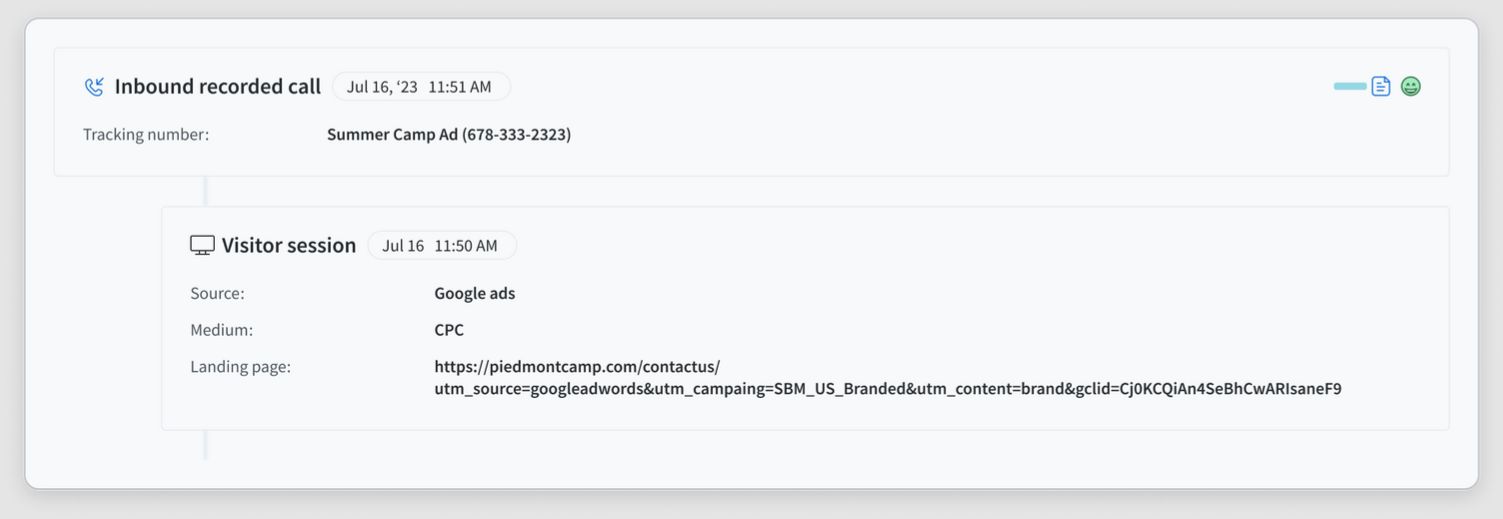
CallRail’s example of the visitor session attached to a tracked call. Source -
Check existing customers before creating opportunities Search by the callback numberCheck open service and estimate recordsAssign one person to respond
Search your CRM for the caller's phone number. Check for an open repair, replacement quote, warranty question or existing appointment. Attach the missed call to the relevant record and preserve the acquisition source already recorded for that project.
A replacement-page visit can support a callback question such as: Were you calling about an estimate or help with your current system? Give existing appointments and unresolved service requests their proper operational route. Track one replacement opportunity for each confirmed project.
-
Use available homeowner context carefully Review PipelineOn matches separatelyConfirm identity through reliable fieldsKeep unmatched records apart
PipelineOn can identify some homeowners visiting your site and provide available contact, property and page activity details. Review service area and existing customer context when those fields are present. Availability varies and a matched visit has not requested an estimate.
Only attach a PipelineOn record to the caller when reliable shared details support the connection, such as the same phone number confirmed in your CRM. Similar timing, ZIP code or a shared household address leaves uncertainty. Keep uncertain matches separate and avoid telling a caller that you know which person browsed.

PipelineOn’s public demo record shows where the visit came from and which pages were viewed. Source -
Build the queue around the next action Put reported urgent needs through dispatchPrioritize confirmed replacement requestsMeasure completed estimates and sold jobs
Use a queue with callback owner, due time and reason for priority. Put caller-reported urgent conditions through your existing staffed escalation process. Follow confirmed replacement inquiries and open estimate callbacks with page-supported replacement interest, then callers whose needs remain unknown.
Return calls using the number supplied by the caller. Confirm address, requested service, authorization to arrange work and appointment availability. Browsing context should guide a useful question. It does not establish SMS consent or justify automated marketing.
Review response time, conversations, qualified replacement requests, completed estimates and sold replacements for unique projects. Compare page-supported and unknown-intent calls without discarding unknown callers. Keep the actual call source and mark which opportunities received this prioritization so the office can judge its value.
What to measure
Start with yesterday's missed calls and review each record manually. Turn the repeatable checks into CRM fields once your office can explain why every caller received their place in the queue.