Reopen a paused hardscape proposal with its Pipedrive owner
A paused patio proposal already has scope, a price history and someone who discussed it with the homeowner. Bring those details into the next conversation. Use Pipedrive to verify the existing deal and its owner before a return visit or campaign response creates another sales task.
Steps
-
Find the original deal and confirm its status Match the property and contactReview the proposal and pause reasonVerify the deal owner
Search Pipedrive for the person and service property. Open the deal detail view and check linked contacts, stage, proposal files, history and outstanding activities. Confirm that the project was paused and that nobody already marked it won or lost for a documented reason.
Check the current deal owner with your team. When the original salesperson has left, assign responsibility through your normal sales process. Keep the original proposal and change history attached to the record so the next person understands what was discussed.
Switch to the pipeline that holds the original proposal and open the deal card to check the owner and last activity.
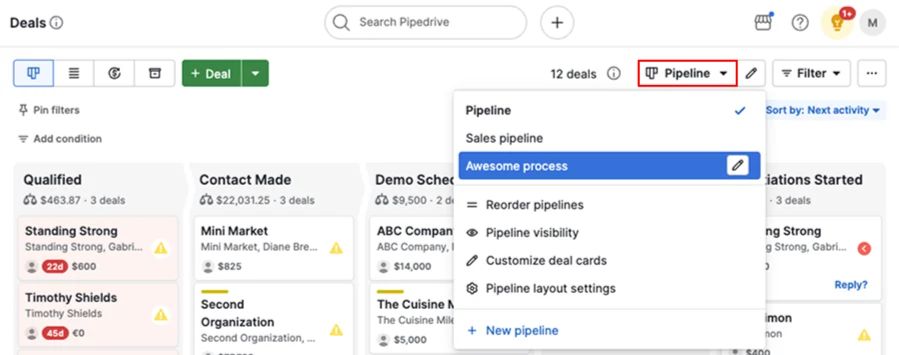
Pipedrive’s sample deal board shows the pipeline selector. Open the pipeline that contains the original proposal. Source -
Reconcile new website context with that deal Check available identity detailsInspect existing visit notesAvoid creating another deal for the same patio
Review available PipelineOn context against the CRM's contact and address. A match can help identify a project worth reviewing, but page activity alone cannot prove that the homeowner resumed buying. Keep uncertain connections separate.
The shared screenshot is PipelineOn's public HVAC demo, showing available fields and page history. Pipedrive's deal screen is separate. Check your actual integration settings and delivery before assuming a visit note reached the original contact.

PipelineOn’s public demo record shows where the visit came from and which pages were viewed. Source -
Give the owner one specific follow-up activity Link the activity to the existing dealUse the homeowner's stated pause reasonCheck suppression and recent conversations
Pipedrive activities can have an owner and links to a deal or person. Create one review or callback activity for the verified deal owner after checking that an equivalent activity is not already open. Record the source of the new signal in a note.
Ask about the original decision: Are you still considering the patio layout we discussed, or has the scope changed? Use an eligible contact channel. Have the estimator review current materials, grading, access and availability before extending an old price.
-
Resolve duplicate records and measure reopened work Review duplicate deals before mergingPreserve notes, owner and activitiesTrack revised proposals through sold work
If someone already created a second deal, compare the contact, property, scope and proposal before changing either record. Pipedrive supports merging from a record's detail view. Have the CRM owner review the merge direction and resulting history.
Count unique projects reviewed, homeowner replies, scope meetings, revised proposals and won work. Check the surviving deal's owner and next activity after reconciliation. Record a new project separately when the homeowner confirms genuinely different work.
What to measure
Keep the original project as the center of the workflow. A clear owner, a current scope and one next activity make a returning homeowner easier for your office to handle.