Use a design gallery to qualify landscaping consultations
A homeowner can save six backyard photos and still be unsure whether you design for a small sloped lot. Show a gallery that answers that question and give them an intake path based on the details your designer actually needs. Then measure the handoff from a project example to a usable brief.
Steps
-
Build the gallery around three real project constraints Use photos with permissionExplain the site condition that shaped the workState what your design team handles
Pick differences you encounter on estimates, such as grade, tight access and existing features the owner wants to keep. Add a short explanation beside each job photo so a homeowner can tell which example relates to their property.
Say what a consultation covers and who approves scope and price. Borrow a question from the designer’s first call, so the page helps the homeowner decide whether to send a brief.
-
Ask for a short site brief on the website Collect service address and the requested outcomeMake photos optionalCheck that the designer can read the request
Ask what the owner wants to use the space for, what needs to stay and whether anything makes the property hard to reach. Give an unsure option for grade or drainage. Use the submitted contact information and confirm who can authorize the design visit.
Test on a phone with both an attached photo and an empty upload. Verify the completed request reaches the correct designer and that the designer can open the images.
-
Find the step where homeowners stop Define gallery visit, brief start and accepted briefSend the final event only after accepted intakeCheck the drop-off against office records
In PostHog, build a funnel from the design gallery to brief start and accepted brief. Have your web person set up the smallest events needed and avoid sending form text, photos or customer contact fields to analytics. Compare the last step with real accepted requests to verify the event fires where you expect.
If people start and rarely finish, review specific friction such as a required project plan or a photo upload that won’t accept phone files. Test one fix before interpreting the next round of numbers.
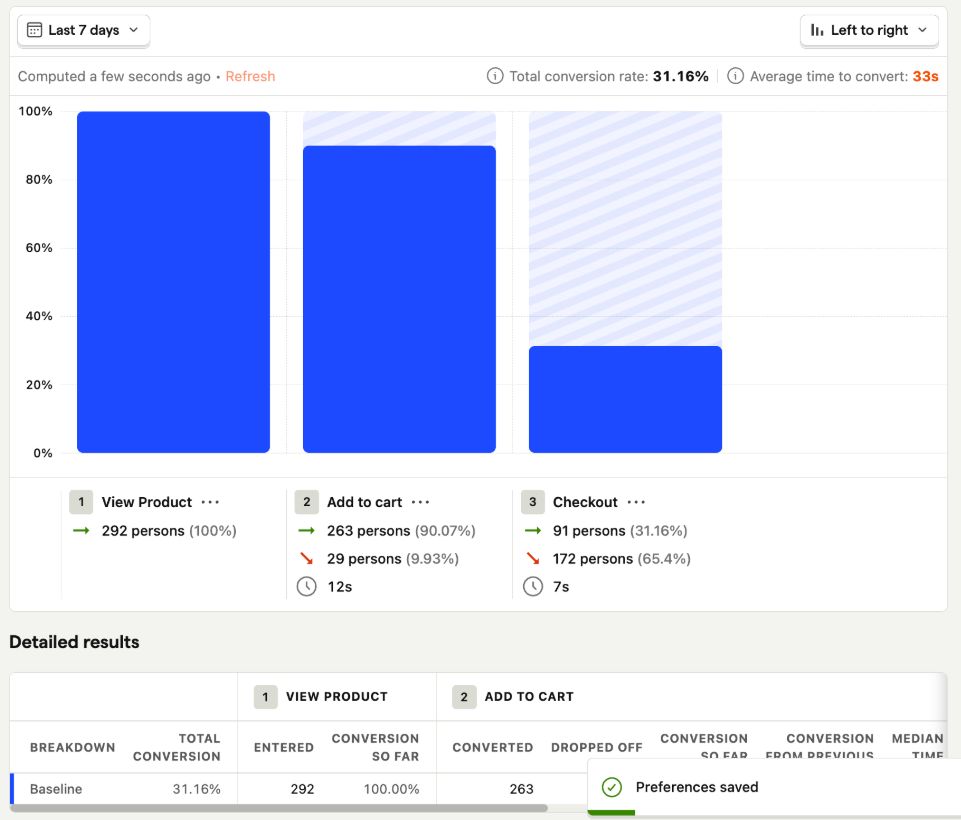
PostHog’s sample funnel. Substitute your page visit, form open and accepted request. Source -
Choose who gets a designer callback Use accepted briefs as the main queueReview only relevant available visitor contextGive each callback a project question
Call the submitted prospects who fit your service area and stated scope. If your PipelineOn setup returns eligible matches with gallery and design-page activity, check the CRM for an existing project or active conversation. Use available evidence to prioritize an eligible review and give the designer a question, such as whether the old retaining wall is staying.
Track briefs that contained useful site facts, consultations attended and proposals issued. Keep matched page views and customer-submitted briefs in separate counts.
What to measure
Ask the designer which briefs were ready for a useful conversation. Use their answer to decide which gallery examples and questions belong on the page.