Turn shade-garden Reel comments into planting design briefs
Use a planting worksheet to find out what a homeowner wants from a shaded area before the designer visits.
Steps
-
Build a site-specific worksheet Ask about the affected areaRecord maintenance preferences
Use a real shaded-garden project with permission. Ask when the customer observes sun and what they want to change.
Let the designer review irrigation and plant questions. Keep unknown conditions available for the site visit.
-
Deliver the requested planner Choose one Reel keywordTest the worksheet link
Configure a Manychat comment trigger for the shade-garden Reel. Use the optional public response to explain delivery.
Test the private reply and link from another eligible account. Follow current messaging rules when continuing.
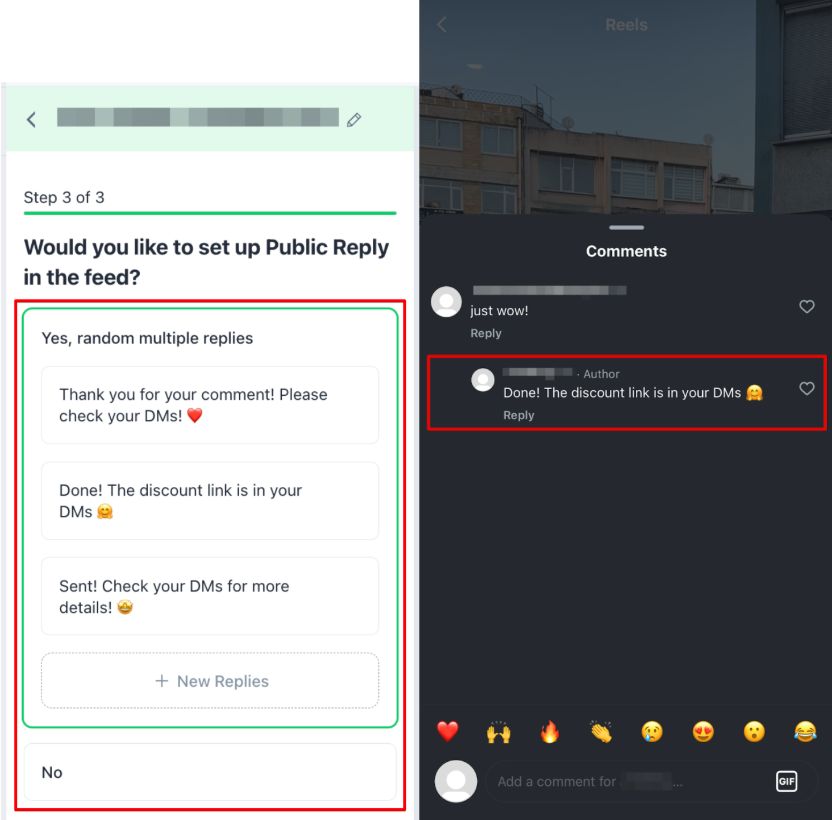
Manychat’s example of the optional public reply that can accompany a comment-triggered direct message. Source -
Prepare the planting brief Confirm the design areaAsk about irrigation access
Give the designer the customer’s goals, maintenance preferences and available photos. Mark observations that still need verification.
Offer a consultation when the customer asks to proceed and the project fits your current design service.
-
Review briefs ready for design Log consultations attendedIdentify missing site questions
Ask the designer which worksheet answers helped and which assumptions needed correction.
Count consultations producing an agreed planting brief. Keep worksheet requests separate from projects sold.
What to measure
The planner should supply the designer with a useful starting brief.