Separate siding repair calls from full replacement estimates
A replacement page can receive a call about one damaged panel. Keep the source, then ask what the customer actually needs. Your office should route supported repairs and whole-home replacements according to the crews and estimating process you run.
Steps
-
Make the service boundaries visible on the page Explain repair and replacement coverageState material limits honestlyOffer the correct request routes
Review the siding page and Search ad together. State whether your company handles small repairs, full replacement or both. Explain how the office reviews existing material and access before arranging the visit.
Keep each service's next step clear. Do not let a repair caller believe a full-home consultation is the only option when your company offers a separate repair team. Route unsupported work accurately without promising material availability.
-
Inspect the tracked call and page evidence Save the actual call referenceReview available source and page contextKeep missing history marked unknown
With visitor tracking, CallRail can show the pages and source touchpoints associated with a caller. Open the actual call timeline and save its reference on the intake record.
The shared CallRail screenshot shows a documentation example. It cannot verify your siding call source. Review the real session and retain uncertainty when page history is missing. The customer's confirmed service request determines routing.
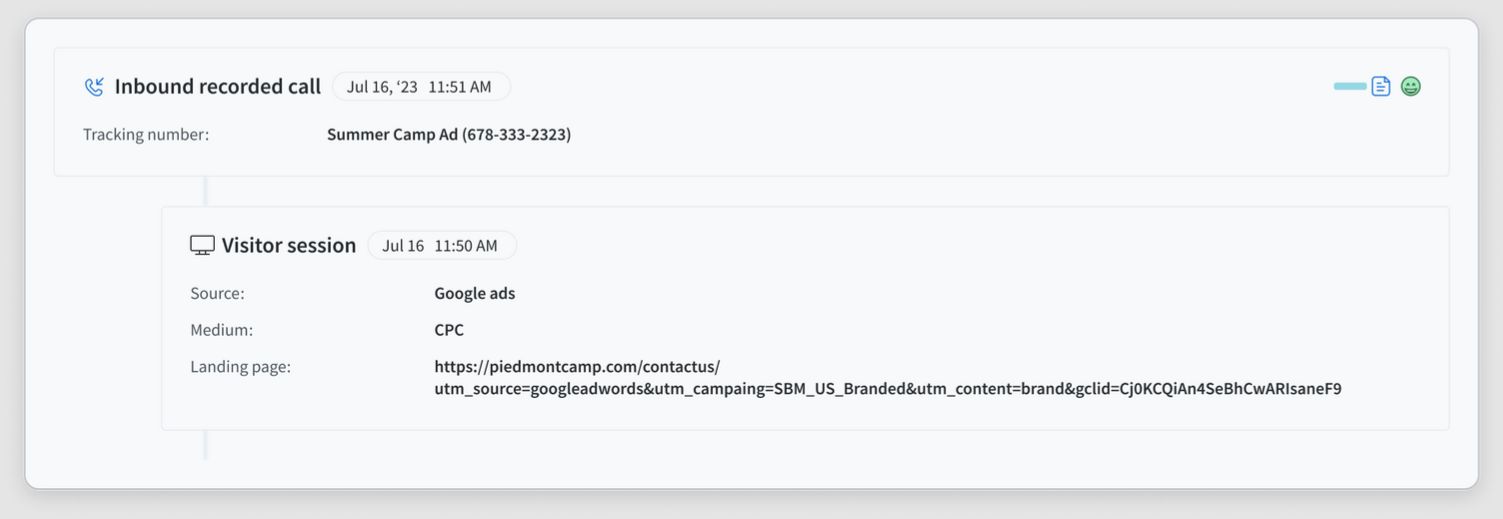
CallRail’s example of the visitor session attached to a tracked call. Source -
Confirm the scope before assigning a visit Collect address and reported issueAsk about approximate extentCheck existing quotes and service cases
Ask whether the person wants a repair, replacement advice or review of prior work. Collect service address, contact details and the area affected as reported. Let material and measurements remain unknown.
Check the existing CRM record before assigning a repair visit or replacement estimator. Keep warranty questions with the service process. Qualified staff assess concealed conditions and material compatibility before committing scope or price.
Available PipelineOn paths can help the office see whether website visitors reached repair or replacement content before asking for service. Attribute a call to an individual session only when the actual tracking and record evidence supports the link.
-
Compare outcomes by actual requested service Count unique property projectsTrack attended visits and proposalsReview repeated service mismatches
Report repair and replacement inquiries separately through qualified visits, accepted quotes and completed work. Record unsupported materials and requests outside coverage. Preserve the original campaign source across the job.
If a replacement campaign repeatedly brings unsuitable repairs, inspect query targeting and page wording. If suitable calls fail at scheduling, inspect office capacity. Use actual request and completion records to decide what changes.
What to measure
Test one repair request and one replacement inquiry from the advertised number. Both should retain their source and reach the appropriate owner.