Keep roof estimate revisions tied to the proposal the homeowner accepts
A homeowner asks to change the roof proposal after a follow-up conversation. Preserve that decision clearly so production receives the accepted version.
Steps
-
Confirm the requested change Identify the current proposal referenceRecord the homeowner's exact choice
Ask which material, area or option the homeowner wants reviewed. Keep unknown specifications for the estimator.
Do not treat a request for a revision as acceptance. Preserve the original document and response date.
-
Assign one revision activity Link the task to the roofing projectGive the estimator a due action
Pipedrive supports activities linked to deals and contacts. Create the revision action on the existing project rather than adding a duplicate sale.
The shared Pipedrive screenshot illustrates pipeline selection. Confirm the real deal, version reference and task owner.
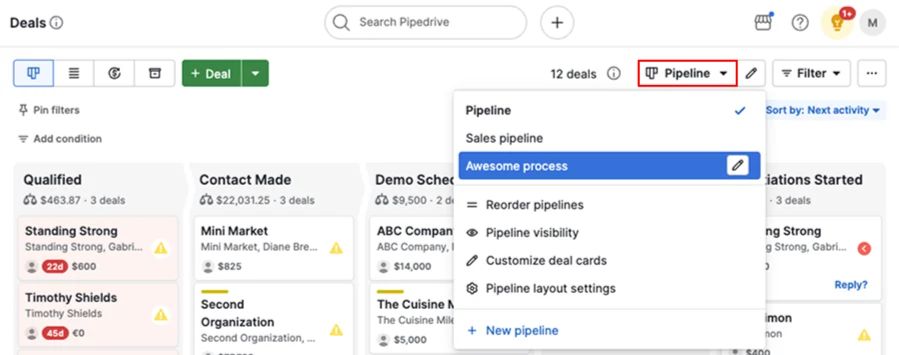
Pipedrive’s sample deal board shows the pipeline selector. Open the pipeline that contains the original proposal. Source -
Issue and verify the current proposal Have estimating approve changed scopeUse the documented acceptance process
The roofing lead should review pricing, material availability and any changed assessment needs before issuing the revision.
Tell the homeowner which version supersedes the previous offer and which questions remain open. Confirm acceptance through your actual process before reserving production.
-
Audit the production handoff Match accepted scope to the job recordReview obsolete-document corrections
Check that production has the accepted document, selected options and relevant field notes.
Track jobs corrected because an older proposal remained active. Test a revised and declined option to ensure neither creates an extra won project.
What to measure
The outcome is one accepted roofing scope with a clear version. Production should not have to infer it from a message thread.