Trace water damage Search calls into staffed urgent intake
Your water damage page needs a working route to the person who can accept a loss. Start with a real call through the published number. Preserve the source and collect the caller's report while your intake specialist checks coverage, crew availability and authorization.
Steps
-
Make the immediate contact route accurate Publish the number your intake team answersState actual coverage hoursSeparate urgent intake from general questions
Put the staffed contact number beside the water damage service description. Explain what the office needs to assess the request. Only advertise round-the-clock response when your staffing and backup arrangement support it.
EPA emphasizes drying water-damaged areas and items within 24 to 48 hours to help prevent mold growth. That guidance supports prompt professional assessment. It does not establish your arrival time or let a marketing page diagnose the condition at a property.
-
Test the call source and unanswered path Call through the actual pageSave the call IDVerify the staffed backup
Use a staff-controlled phone to test the website number and your Search call route separately. Check whether each reaches intake and what happens when the primary person is busy. Save the test time and call reference.
CallRail's visitor tracking can attach website page and source context to a caller timeline. The shared screenshot shows its documentation example. Inspect the actual test call before assuming your water damage landing page and campaign are recorded.
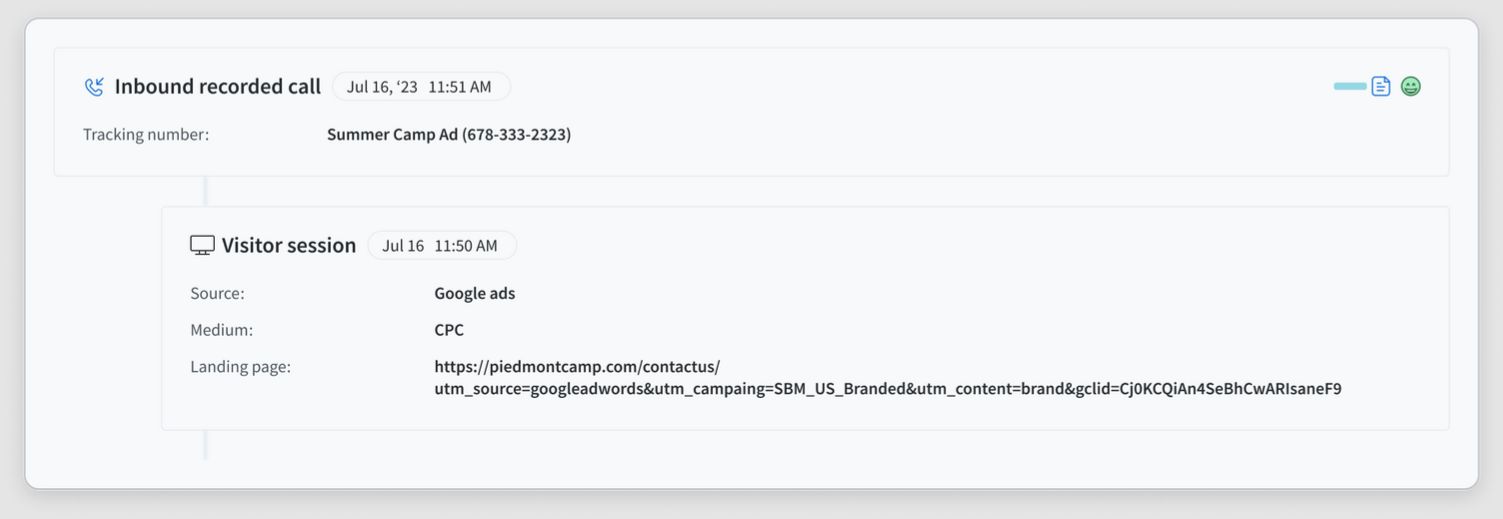
CallRail’s example of the visitor session attached to a tracked call. Source -
Let intake accept and assign the actual request Confirm address and callback detailsRecord incident information as reportedAssign an intake owner
Ask for service address, contact role, when the issue was noticed and what the caller reports. Apply your company's staffed escalation and site-clearance process. Keep technical assessment and any immediate instructions with qualified personnel.
Check for an existing loss or active crew visit before opening another job. Have intake confirm service fit, availability and the next step. A call or website visit alone does not establish authorization for work or insurance coverage.
-
Reconcile calls with accepted losses and attended visits Separate answered calls from accepted workMerge repeated attemptsTrack attendance and completed services
Review unique callers, answered calls, accepted loss requests, assigned visits and completed services. Link repeats to the same incident. Record coverage declines, existing-job questions and other services separately.
Compare your campaign spend with accepted work and final job outcomes after records mature. Inspect missed calls and unassigned requests each shift. A duration-based advertising conversion needs operational confirmation before your office treats it as a restoration job.
Use eligible PipelineOn page context to review which public service pages people find before an unanswered call. Keep a missed number in the dispatched callback queue even when there is no match. Its priority comes from the reported incident and your staffed triage rules.
What to measure
Keep one verified call trace as your reference. Repeat it after a number, forwarding rule, campaign destination or intake shift changes.