How drain cleaners can turn missed calls into booked jobs
A missed drain call needs an owner inside your office. Start with the callback queue, then add a text response for callers your messaging setup is authorized to contact. The useful outcome is a dispatcher who knows the address, reported problem and next action.
Steps
-
Test the number customers actually dial Map forwarding and voicemailAssign a callback ownerCheck messaging consent and sender setup
Call your advertised number from an outside phone and let it ring unanswered. Check whether the phone system records a missed call, retains the caller's number and creates a task in the right office queue. Repeat outside office hours.
Confirm your provider's consent, number registration and opt-out requirements before enabling automated SMS. Keep a phone callback route for callers without an eligible messaging record. An inbound call alone should never enroll someone in a promotional sequence.
-
Configure one useful text response Identify your companyAsk for the ZIP and reported problemKeep opt-out handling active
HighLevel's built-in setting sends a text for every missed call, including repeat attempts. For one acknowledgment per service request, test a separate workflow that checks prior messages and leave the built-in sender off. If you use the built-in setting, find it under Phone System, Voice, then Voicemail & Missed Call Text Back. Send a test and read the delivered message on a real phone.
Use a response such as: This is [company]. We missed your call. What ZIP code needs service, and what is backing up? Our office will review your reply. Keep the platform's sender and opt-out text. Add your real callback hours so an overnight message never implies immediate dispatch.
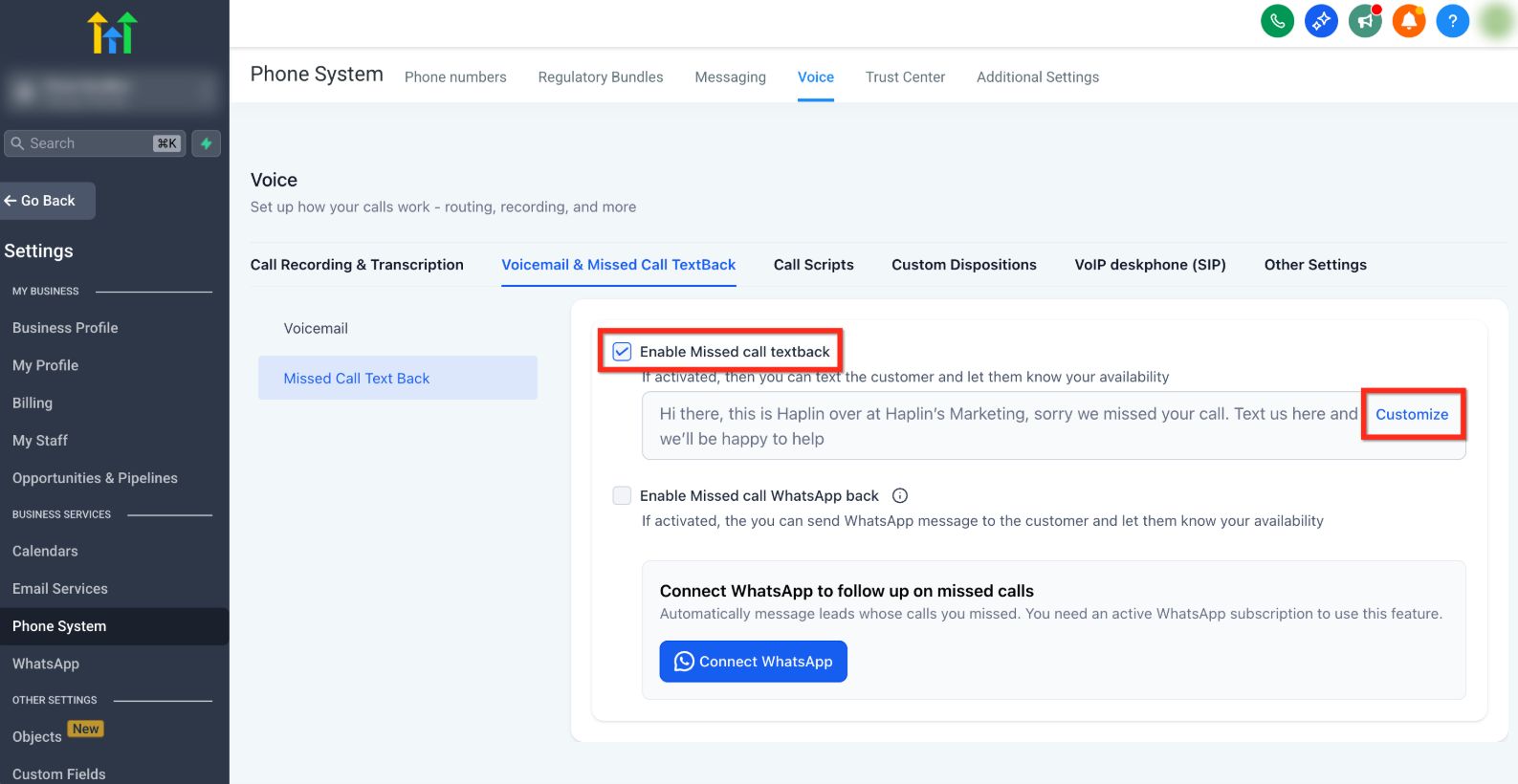
HighLevel’s Missed Call Text Back setting and Customize button. Source -
Route replies by what the caller reports Confirm address and service fitEscalate active overflow reportsRecord availability separately
Give your dispatcher fields for service address, affected fixtures, whether the caller reports active overflow, property access and callback number. Treat each answer as the caller's report. Your intake system should collect facts and apply your office's escalation rules.
Send urgent reports to the staffed dispatch or on-call route you actually provide. Send routine requests to the next callback queue. Your dispatcher confirms the scope, fee and available arrival window before marking a job booked. Avoid promising same-day service through an unattended message.
If an eligible caller needs more detail, link them to your drain service page. Review available PipelineOn matches after actual website visits and check the original call and CRM record before linking any two records. A campaign tag gives you source context. A shared ZIP or timestamp alone leaves the caller unknown.
-
Stop duplicate messages and count actual jobs Test repeat calls and STOPClose tasks when the office respondsUse one job record per service need
Call twice, reply once, opt out and call again during your test. Confirm the resulting behavior. If repeat attempts produce unwanted texts, configure and test a guarded workflow before rollout, with the built-in sender disabled so both paths cannot fire.
Review unique missed callers, delivered messages, replies, qualified callbacks, booked jobs and completed jobs. Merge the same caller's repeated attempts into the existing service request. Record spam, outside-area requests and already-booked customers so your booking rate has a useful denominator.
What to measure
Launch on one number with a dispatcher responsible for every reply. Review the first real conversations before expanding the workflow across your phone system.