Keep appliance specifications attached to kitchen showroom referrals
A showroom referral can arrive with a refrigerator preference that changes before your designer opens the file. Keep the model number, document source and selection status with the project. Your team needs to know which appliance choice the current design assumes.
Steps
-
Save the actual introduction and reported selections Record the referring showroom and homeowner's agreed contact route.Mark tentative and confirmed appliance choices separately.
Keep the named showroom contact and original introduction with the kitchen request. Confirm that the homeowner wants your company to discuss the project, then verify the service property and authorized decision-maker. Record model numbers as reported until the customer and designer confirm them.
Ask whether the appliance is already ordered, under consideration or still to be chosen. Keep that status beside the identifier. A showroom conversation does not establish a purchase, delivery date or approved kitchen design.
-
Retrieve the correct manufacturer documents Match installation information to the exact model.Record the document source and retrieval date.
Use the manufacturer's current support site to retrieve the installation information for each proposed model. GE Appliances, for example, provides a model-number lookup for installation instructions and other manuals. Use the corresponding official source for another brand.
Have your designer check the document against the actual appliance identifier before using it. Keep unanswered fit, service and installation questions for the appropriate trade. A sales brochure or visually similar appliance should not silently become the specification for a cabinet opening.
-
Attach the current specification to the design project Open the correct kitchen deal and check its owner.Keep superseded selections visible in the history.
If you use Pipedrive, select the kitchen-design pipeline and open the deal for the actual property. The screenshot shows that pipeline selector. Confirm the owner before adding documents. Use the deal's Files tab to attach the reviewed specification where your team's permissions allow access.
Name the file or note so the model and review date are clear. Record which design version uses it and mark an old selection superseded after a change. Pipedrive's file attachment feature stores documents with the record. Your designer still needs to maintain the selection and approval history.
Check any eligible return PipelineOn shows against the actual referral record and chosen model. Send a question to the current designer when specs remain open. The model number on the approved specification sheet governs the estimate.
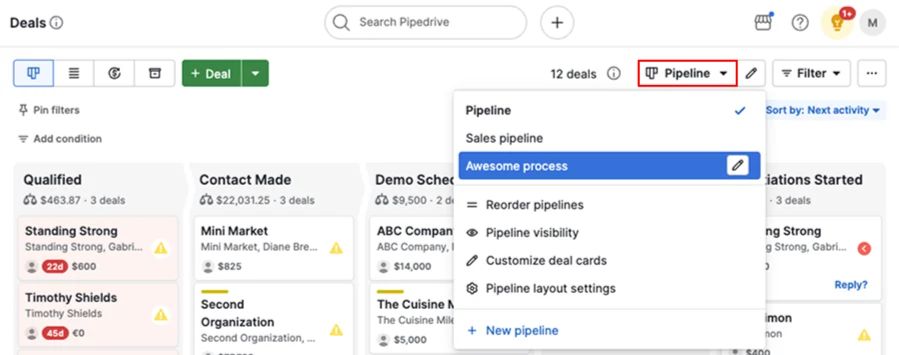
Pipedrive’s sample deal board shows the pipeline selector. Open the pipeline that contains the original proposal. Source -
Verify the changed-selection handoff before trade pricing Test a model change on a controlled project.Confirm every reviewer can identify the current specification.
Use a labeled test project with an initial appliance choice and a replacement model. Ask the designer and estimator to identify the active document, related design and unresolved questions. Correct the handoff if either person starts from the old selection.
Keep the original showroom source through design revisions and record later touchpoints separately. Review referred consultations, specifications accepted for design, pricing-ready scopes and signed work. Use repeated missing-model questions to improve what the showroom sends with the next introduction.
What to measure
Before the design moves to pricing or ordering, have the owner confirm the current selections and documents. Preserve who changed each selection and which version the team approved.