Keep storm-related drain calls ordered by actual dispatch review
During a busy storm period, several sources can send requests into the same office. Source context can help staff find a record, but dispatch needs the customer's actual report.
Steps
-
Use the dispatch-approved intake brief Collect address and reported conditionRead back the callback details
Record what the caller reports, the service location and any existing request reference. Use the approved urgent escalation wording when appropriate.
Avoid diagnosing the source of water or assigning priority from a marketing page alone. The responsible dispatcher decides the operational queue.
-
Preserve available source context Use confirmed call recordsKeep session evidence conditional
CallRail caller timelines can provide available session and call context. The shared screenshot illustrates that surface.
Verify the actual request and address with the caller. Visitor tracking availability varies, and a viewed page is not proof of severity.
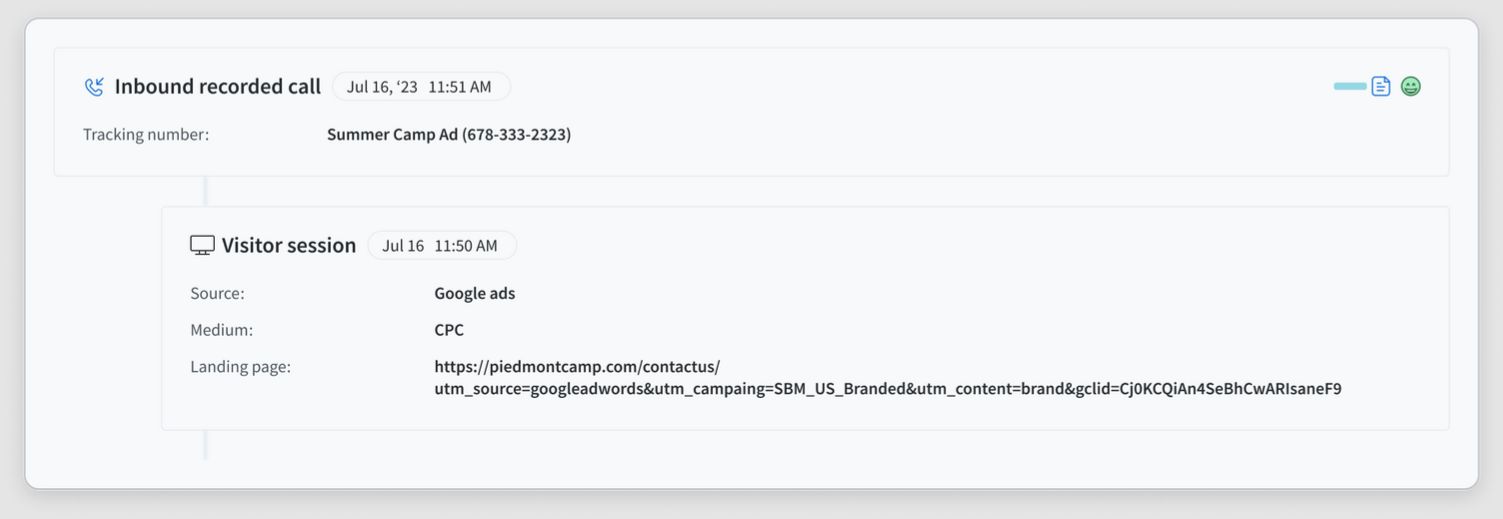
CallRail’s example of the visitor session attached to a tracked call. Source -
Assign one dispatch owner Check repeat contacts against the same episodeConfirm the actual next step
Review repeated calls and forms for the same property concern before creating another dispatch task.
Read back whether the customer is awaiting a callback, under dispatch review or confirmed for a visit. Do not imply a crew is traveling until dispatch accepts it.
-
Audit the busy-period handoff Track unacknowledged requestsReview priority and promise corrections
Test a repeat call and an unavailable dispatcher using marked staff records.
Measure requests without owners, duplicate dispatch tasks and incorrect arrival promises. Fix the route or script that failed under load.
What to measure
Keep the queue grounded in the actual report and a dispatcher-owned decision. The customer should hear an accurate status.