Invite Christmas light customers back after checking stored inventory
Last year's lighting customer can request a reinstall before your office checks whether the stored equipment still matches the property. Verify the prior job first. Then send a useful invitation that lets the customer confirm the scope or request changes before you reserve crew time.
Steps
-
Reconcile the prior installation with storage Match the customer and service propertyCheck recorded equipment and scopeRemove unresolved service cases
Start with completed jobs, the agreed takedown scope and your storage records. Confirm whether the company or customer supplied the lights and whether your records identify the stored set. Have the crew lead review missing or uncertain inventory.
Check for a changed address, an open service issue or an existing booking before creating the invitation list. Keep incomplete records in a review queue. A prior customer record alone cannot establish that this season's installation is ready to schedule.
-
Send a reinstall review page by eligible email Show the actual prior service termsAsk about additions and changesRespect current contact preferences
Create a page explaining how returning customers confirm the roofline, color, additions and preferred week. State what your current service includes, including takedown or storage where applicable. Ask the customer to request a review of any changed property or scope.
Send the page to eligible contacts using your provider's audience rules. FTC commercial-email requirements include accurate sender information, a postal address and an opt-out route. Keep those controls active even for returning customers.
-
Assign the review on the existing project record Check the prior deal and current ownerRecord requested changes separatelyCreate one next activity
In Pipedrive, open the prior deal and inspect its linked contacts, history and proposal. Use the pipeline selector to choose the seasonal install pipeline, then open the prior deal. Confirm inventory with your own storage records.
Give the current owner one review activity and link any new seasonal opportunity to the prior job. Have the crew lead confirm equipment, access and time for additions. Keep the customer's requested week separate from a confirmed installation date.
If PipelineOn shows an eligible return to the reinstall page, check the matched property against the stored inventory record. Give an existing customer’s reply priority. Use any other verified return to help the original deal owner choose which unopened seasonal task to review.
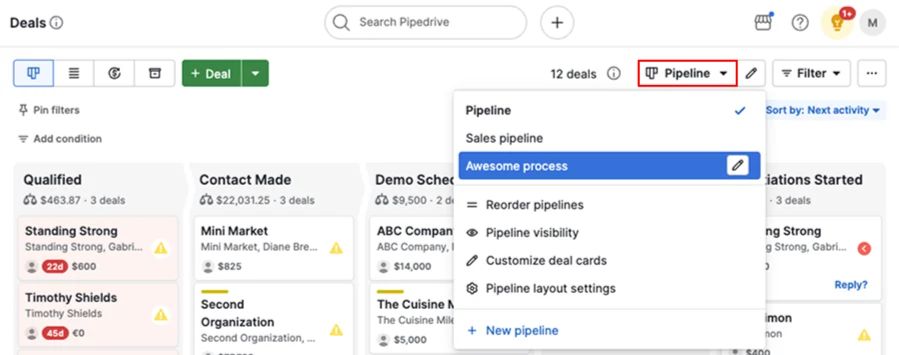
Pipedrive’s sample deal board shows the pipeline selector. Open the pipeline that contains the original proposal. Source -
Confirm the season and measure completed reinstalls Verify installation and takedown capacityConfirm updated scope and priceTrack completed seasonal work
Offer a date after checking both installation and takedown capacity. Send the accepted scope and current price through your normal agreement process. Make sure the office and crew see the same equipment and addition notes.
Track eligible invitations, replies, accepted reinstalls, completed installations and takedowns. Record inventory problems, scope changes and duplicate bookings. Use actual crew time to plan the next invitation release.
What to measure
Start with a small set of customers whose equipment and job history your crew can verify. Expand the invitation once the first reinstall requests reach a clear scheduling decision.