How to Identify Website Traffic
To identify website traffic, review the source of each recorded session, the pages visited and the enquiries received. Visitor identification can add homeowner details when a match is available. For home services, review the property, service-area fit, returning visits and existing CRM history before assigning a next step.
A traffic source tells you how a visit reached your website. Your office needs more information to decide whether that visit belongs with an existing estimate, a new household or a customer who needs help.
To identify website traffic, work through three questions: where did the visit come from, what happened on the site, and can you connect it to a useful customer record?
1. Identify where the traffic comes from
Start with your analytics. In GA4, the Traffic acquisition report uses session-level source information. Google’s traffic acquisition documentation explains the report and campaign tagging.
Review Session source / medium and the campaign information your setup collects. Then look at the landing page and the enquiries recorded for that traffic. Google explains the difference between first-user and session-level dimensions in its traffic-source guide.
For a home service business, a useful review starts with a specific service and location. Check whether an AC replacement campaign sends visitors to the replacement page and whether the campaign targets the area your crews cover.
A phone-link click, a submitted form and a booked appointment describe different actions. Keep them separate in the report so your marketer and office are discussing the same outcome.
2. Connect eligible visits to homeowner records
Analytics helps you review traffic. Website visitor identification software can add available homeowner details when a visit has an identity match.
Check the kind of record a provider returns. A company name can be useful for a commercial contractor. A residential contractor needs information that helps the office review a household and the property where work could happen.
PipelineOn combines eligible homeowner matches with available website activity and property information. Some records will have missing fields, and some visits will have no match. Evaluate the information returned on your own traffic.
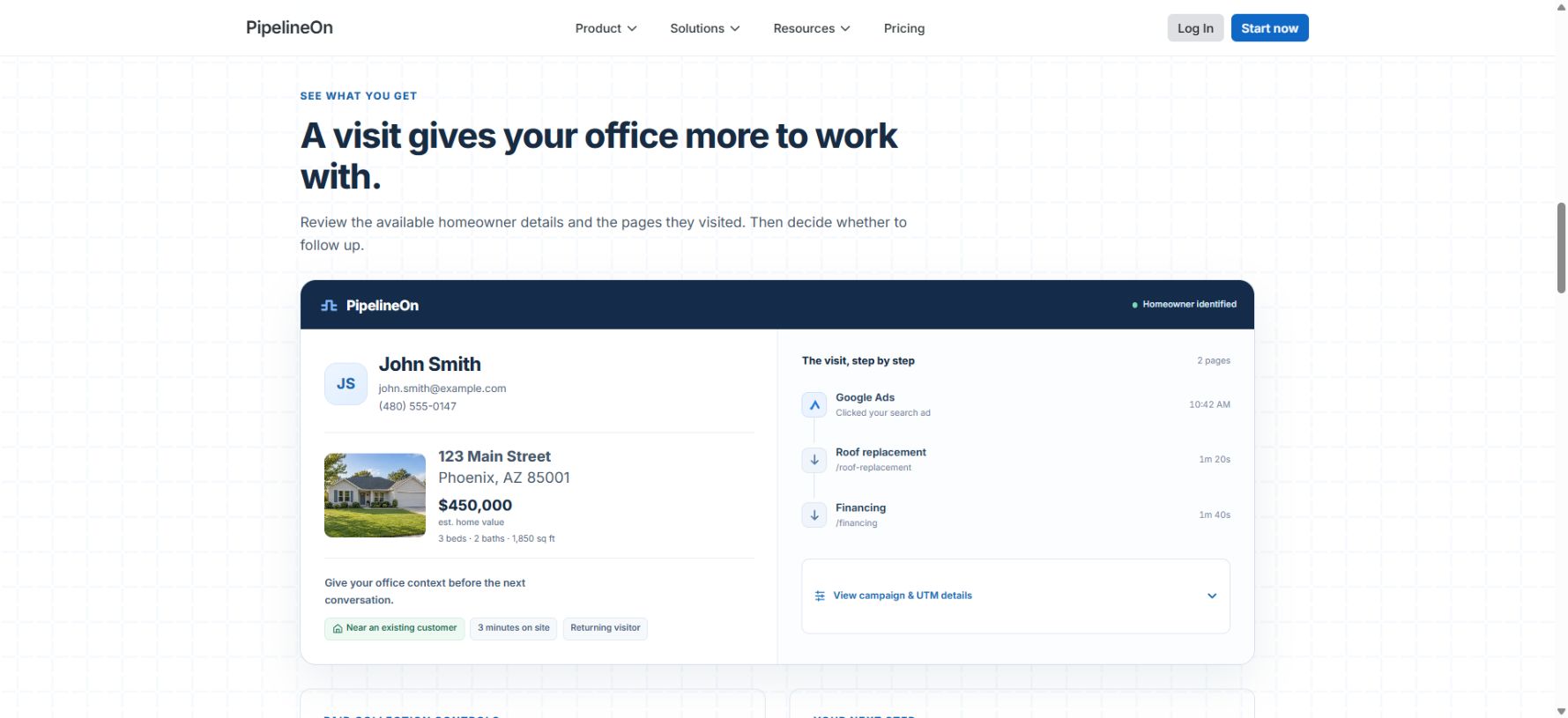
Public PipelineOn demo with example data. The record shows homeowner and visit information together.
3. Review the property and returning visits
Confirm service-area fit before assigning follow-up. An associated address gives the office an early check. If the visitor is researching another property, confirm where the work would take place.
Available property enrichment, such as living area or estimated value, adds background for reviewing the home. It does not establish the condition of the equipment, the project scope or the price.
Read the visit history in order. A homeowner who returns to a replacement page and then opens financing has a different recorded journey from someone reading a maintenance article. Use that activity to prioritize a review and prepare useful questions.
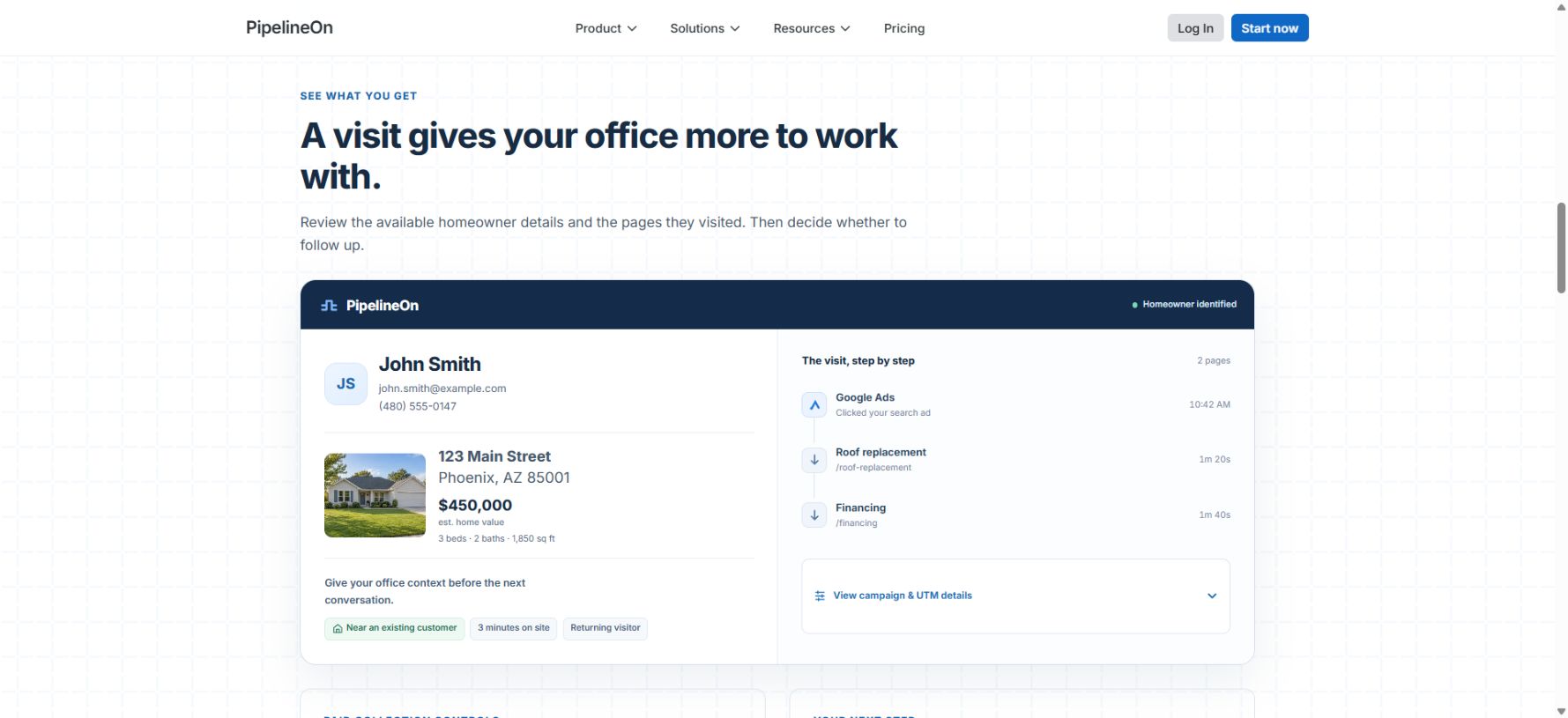
Example visit history from the public demo. Recorded page activity gives the office context for its review.
4. Check the CRM and measure the result
Your CRM may already contain an estimate, appointment or previous conversation. With a supported connection, PipelineOn can add available customer context to an eligible matched visit. The history depends on the account, records and connection settings.
Assign the record to someone who can check the existing relationship. A returning customer may belong with the office. An open estimate may belong with the person who prepared it. Keep calls and form submissions in the review to avoid counting the same enquiry twice.
Track matched records, usable records, enquiries, appointments and completed jobs separately. Add the time your team spends reviewing them. That gives you a practical way to evaluate the traffic you already pay to bring to your website.
See PipelineOn’s homeowner identification workflow or read the step-by-step website visitor identification guide.
Frequently Asked Questions
How do I identify website traffic?
Start with source and campaign reporting in your analytics. Check the landing pages and recorded enquiries. Add visitor identification if your office also needs available homeowner records for visits that did not produce a call or form.
Can I find out who visited my website?
Visitor identification can match some visits to available identity records. It does not identify everyone. Check whether a provider returns homeowner details suited to residential services or company records suited to B2B sales.
How do property details help identify useful traffic?
An associated address helps your office check service-area fit. Available property facts give background for reviewing the record. Confirm the service property and the actual work required with the homeowner.
Written by
PipelineOn Research Team