Match restoration ads to the incident intake your team can staff
A water-damage ad should lead to an intake your office can actually answer. Review the reported incident and response promise before expanding the campaign. Keep requested assessments separate from accepted projects.
Steps
-
Approve the advertised response Confirm territory and staffed hoursDefine the intake owner's authority
Have your service lead approve the incident types and properties your team accepts. Record the person responsible for each shift.
Write what the office can promise about review and dispatch. Keep insurance coverage and technical assessment outside the advertising claim.
-
Match the page to that service Show the actual contact routeSeparate new incidents and existing jobs
Open the live ad destination on a phone and compare the offer, hours and territory with the ad.
Google recommends aligning advertising and landing-page offers. Keep the page from promising unavailable immediate attendance.
-
Test intake acceptance Inspect the request and office ownerKeep sensitive content out of analytics
Submit a controlled request and confirm incident description, property, source and assigned owner survive delivery.
The shared PostHog image is a sample funnel. Build page, start and accepted-request events and reconcile acceptance with actual records.
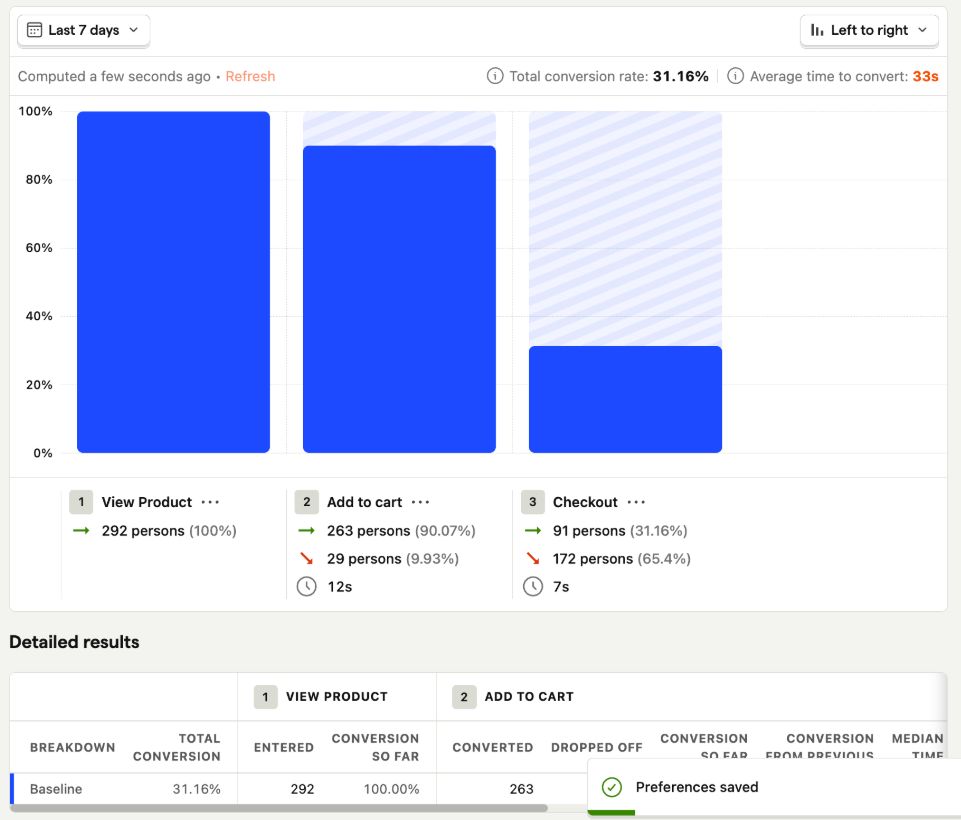
PostHog’s sample funnel. Substitute your page visit, form open and accepted request. Source -
Review qualified response outcomes Track accepted assessments and authorizationsRecord capacity-related declines
Measure accepted inquiries, staff contacts, attended assessments and authorized work. Preserve reported information separately from professional findings.
Review requests declined for coverage or unavailable response. Fix the operational bottleneck before buying another group of visits.
What to measure
Keep the tested request and shift coverage with the campaign. Recheck both when the offer, territory or staffing changes.