Use an island-planning Reel to collect the household’s actual kitchen goals
An island worksheet can help a designer learn which activities matter before discussing a layout.
Steps
-
Write a use-focused worksheet Ask what happens at the islandKeep dimensions for review
Ask about seating, food preparation, storage and the activities the customer wants to improve.
Use a permitted project to explain what the designer asked. Leave layout dimensions and feasibility to the site process.
-
Deliver the requested worksheet Choose the relevant Reel keywordTest its private reply
Set the Manychat comment trigger and use its optional public response to explain delivery.
Open the resource from a separate eligible test account and follow current messaging rules when continuing.
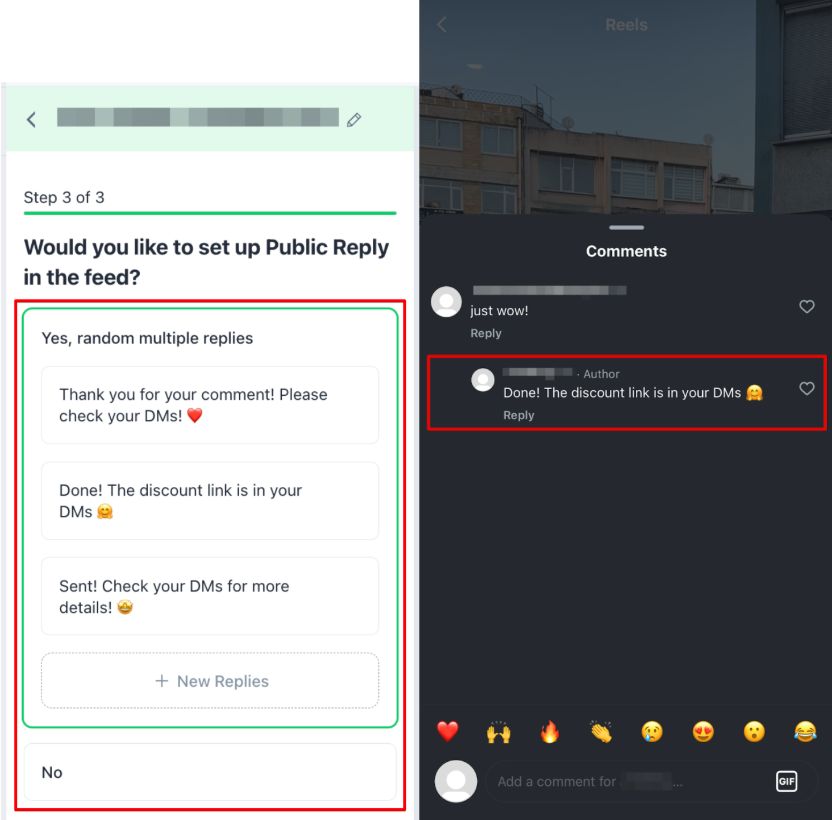
Manychat’s example of the optional public reply that can accompany a comment-triggered direct message. Source -
Prepare the designer’s discussion Summarize competing prioritiesAsk who will join the consultation
Give the designer the household’s desired activities and which are most important. Note existing layouts the customer hopes to retain.
Offer a consultation when the customer requests it and the designer can discuss the project.
-
Record an agreed design brief Log consultations attendedCapture unresolved priorities
Ask which goals the consultation resolved and what still needs a household decision. Assign the next action.
Count usable design briefs separately from worksheet downloads and revise questions that produce vague answers.
What to measure
The worksheet should prepare a specific discussion about how the household uses the kitchen.