Turn Instagram fence questions into prepared estimate visits
A fence planning checklist can help someone describe the project before your estimator arrives. Use Instagram to offer that resource, then give interested people a short site request. Keep property boundaries, approvals and installation design subject to the checks your team normally performs.
Steps
-
Build the checklist around your estimator's questions Ask the fence purpose and desired materialInclude gate use and accessKeep boundary uncertainty explicit
Publish a page with questions about privacy, pets, security, desired material, gates and site access. Invite approximate scope with an unsure answer. Explain what your estimator verifies during the visit and how the office handles boundary questions.
Make clear that the checklist does not establish a property line or approval to build. Before digging, the responsible party must follow the applicable utility notification process. Alabama 811 provides one official example of a state-specific before-you-dig process. Verify the requirements for your actual service location.
-
Connect the relevant Instagram post to the resource Use a job image you can publishOffer the checklist honestlyTest the comment and reply path
Show a permitted project photo and invite people to comment PLAN for the checklist. Configure Manychat's Instagram post or Reel comments trigger for the intended post. Keep the first reply focused on the promised resource.
The shared Manychat screenshot shows its public reply configuration example. Test the automation with an eligible account and verify that the private link opens your actual checklist. Use the platform's current interaction rules before adding any follow-up messages.
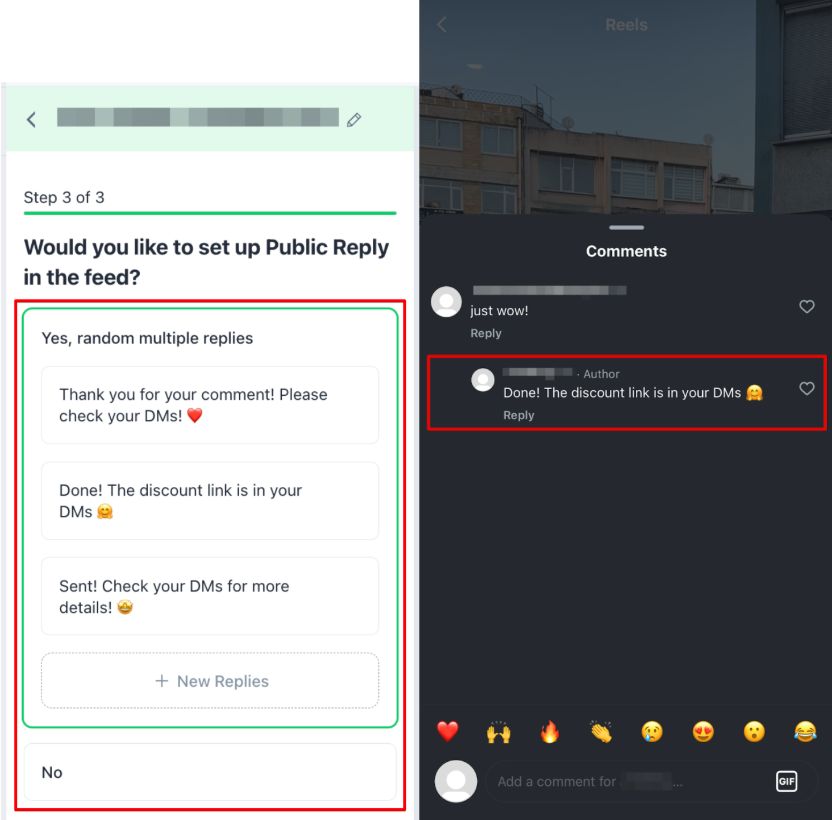
Manychat’s example of the optional public reply that can accompany a comment-triggered direct message. Source -
Invite a prepared site estimate Collect the service address and contactPass gate and access needsAssign one estimator
Place a request beside the checklist for people who want an estimate. Ask for address, contact details, purpose, rough scope and gate needs. Let the homeowner report unresolved boundary or approval questions for discussion.
Check the CRM for an open quote and attach the request to the same project when appropriate. Have the office confirm territory, authorization to arrange the visit and estimator availability. Keep checklist recipients separate from actual estimate requests.
-
Count prepared visits and sold fence projects Track the resource and request separatelyRecord attended estimatesReview missing-information delays
Measure checklist delivery, site requests, qualified appointments, attended estimates, proposals and sold jobs. Preserve the Instagram campaign source without counting each reply or repeated request as a new project.
Ask the estimator which visits still lacked important gate, access or scope details. Improve the checklist around those gaps. Keep technical measurements and final installation decisions in the estimator's documented process.
If PipelineOn identifies an eligible household returning to the checklist and fence estimate page, check your territory and any open project. Send the estimator only records with a clear next question and available, appropriate contact details.
What to measure
Start with one useful checklist and one post. Expand after the request reaches your office with enough information to arrange a productive site visit.