Move an accepted generator proposal into a ready installation
An accepted generator proposal can sit for weeks if the equipment allocation or site approval stays unresolved. Give the office four clear checks before it offers a date. Start from the accepted scope and let the installation lead confirm readiness.
Steps
-
Open the accepted proposal and keep its scope intact Confirm what the customer acceptedRecord the approved project and service addressCheck whether another install record exists
Open the signed or otherwise documented acceptance in your sales records. Compare the service property, selected equipment and agreed work with the current proposal version. Give any scope changes to the responsible estimator for review before you schedule the changed work.
Use Pipedrive’s pipeline selector to open the sales pipeline that contains the accepted proposal. Open the deal and check its history and active tasks. The screenshot shows the selector. Assign one person to carry the accepted record into installation planning.
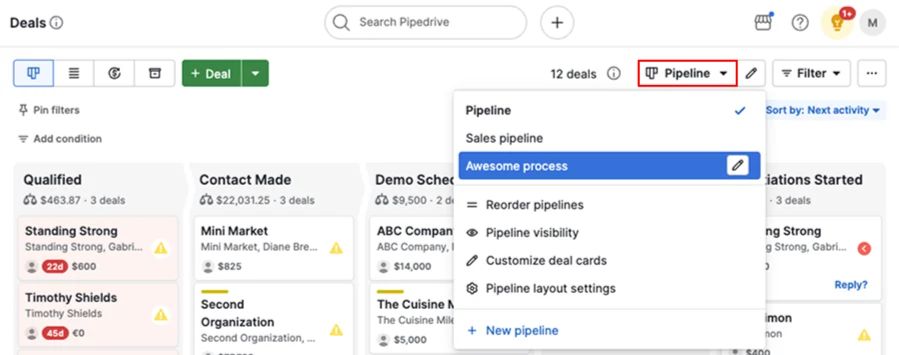
Pipedrive’s sample deal board shows the pipeline selector. Open the pipeline that contains the original proposal. Source -
Check who is closing each readiness item Verify equipment allocation with your supplierConfirm who handles site and approval tasksRecord dates for unresolved items
Have the person who handles purchasing confirm the equipment and deliverable date with the supplier. Have the installation lead identify site, trade and approval tasks for this property. Confirm what each participant owns, including any work your company has coordinated with others.
Use Ready or Waiting with a named owner and a next check date for each item. Keep the existing acceptance valid according to your own agreement. Send an unexpected scope or price change back for review.
-
Send the customer a status page and one next action Explain what you still need from the homeownerUse the verified service contactWait for a confirmed response where access is required
Send a short status update from the coordinator. Point to a project-preparation page explaining access, who will confirm site questions and how the office will notify the customer once ready. Ask for one specific reply if the customer must arrange access or select an appointment window.
If PipelineOn shows an eligible return to the preparation page and it agrees with the accepted project record, use it to decide which outstanding question the coordinator should check. Use the customer’s direct answer and the installation lead’s decision to set readiness.
-
Offer a date when the crew can actually install Confirm open items with the installation leadRecord the agreed appointment and responsible crewMeasure moves caused by missing readiness
When the equipment and required approvals are confirmed, give the customer scheduling options your crew can cover. Send a confirmation through your normal office process and check the same date appears on the installation record.
Track accepted proposals, installations ready to book, scheduled work and jobs completed. Record whether a scheduled job moved because of equipment, site access or an unfinished approval, and use the reason to fix next month’s handoff.
What to measure
Keep the accepted proposal and installation handoff together. Count a project ready to schedule when the team can name the equipment, access plan and person responsible for each required approval.