Keep a landlord's electrical requests on the right property records
One landlord can ask about a panel at one house and lighting at another. Your office needs both addresses and both scopes intact. Match the person first, then identify the property and project before assigning another electrical estimate.
Steps
-
Confirm the person, service address and authority Ask for the actual property on every new request.Keep billing and service addresses separate.
Verify the contact using details your office can check, then ask which property needs the work. Save the full address, unit where relevant, requested scope and who can authorize entry. A billing address on the contact may be a different location.
Ask whether the request updates an existing electrical project or concerns separate work. Let the electrician review reported technical needs. Keep the landlord's words and any existing job reference in the request so dispatch does not have to infer the property from a phone number.
-
Review linked deals in the correct Pipedrive pipeline Use the existing person when the identity is verified.Open each relevant deal to check its service property.
Pipedrive allows a person to have multiple linked deals. Use the contact history to find the existing electrical projects, then compare each deal's service address and scope. A repeated call about one property should update that project through your office process.
Use the pipeline selection dropdown to inspect the process that owns the requested work. The screenshot shows this selector. Open the deal to check its details. Keep separate property projects distinct even when their contact, payer or requested date is the same.
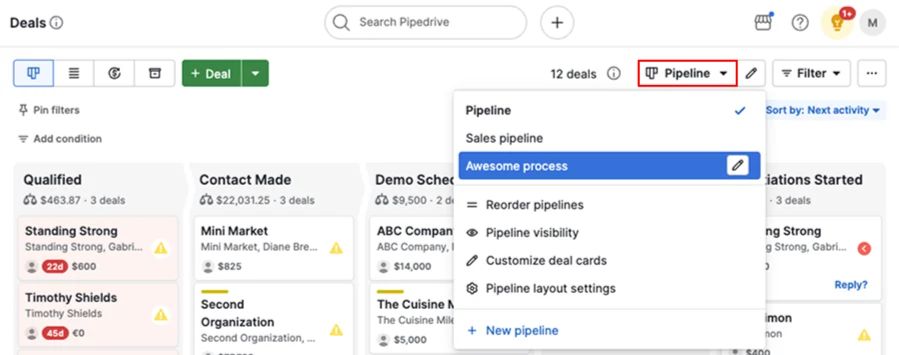
Pipedrive’s sample deal board shows the pipeline selector. Open the pipeline that contains the original proposal. Source -
Assign one owner to each confirmed project Put access and tenant coordination on the property request.Keep open activities tied to the intended deal.
Assign the estimator or service owner after confirming the scope and property. Save the authorized access contact and callback arrangement in the correct job or deal. Check for an equivalent open task before creating another.
Test two requests from the same controlled contact for different properties and a repeat request for the first property. Have the office identify the owner and next action for all three. Correct any rule that merges the properties or creates another visit for the repeated project.
-
Use website context without replacing the service address Treat homeowner matching as additional evidence.Measure opportunities by confirmed property and scope.
If PipelineOn is live, review available contact, property and page context alongside the request. A household address in a visitor record may differ from the landlord's service property. Confirm the requested address directly before attaching the context to a project.
Count unique project requests, attended assessments and completed electrical jobs from the property and deal records. Keep unknown matches separate. Review mistaken-property assignments and duplicate activities so the office can repair the field or automation that caused them.
What to measure
Use the same-contact, different-property test after CRM or intake changes. Each estimator should receive a confirmed address, a current scope and one clear next task.