Nurture cabinet painting photo requests from Instagram Reels
Someone who likes your cabinet finish may be planning a kitchen project for later. Give them a useful photo checklist, ask when they want the work and keep the follow-up tied to that answer. The aim is an estimate conversation your homeowner is ready to have.
Steps
-
Offer a cabinet photo checklist from one Reel Show a cabinet project you have permission to share.Use a comment keyword and a private reply that invites interaction.
In Manychat, select the Instagram post or Reel comments trigger for the cabinet project and add a keyword such as CABINETS. Offer a checklist showing which photos help your estimator understand the kitchen. Keep the promise specific to that resource.
Set the first private reply to ask whether the person wants the checklist, with a quick reply they can tap. Manychat explains that a private reply alone does not open the messaging window. Use the qualifying interaction before continuing the automation, then send the website checklist link. Test with another Instagram account.
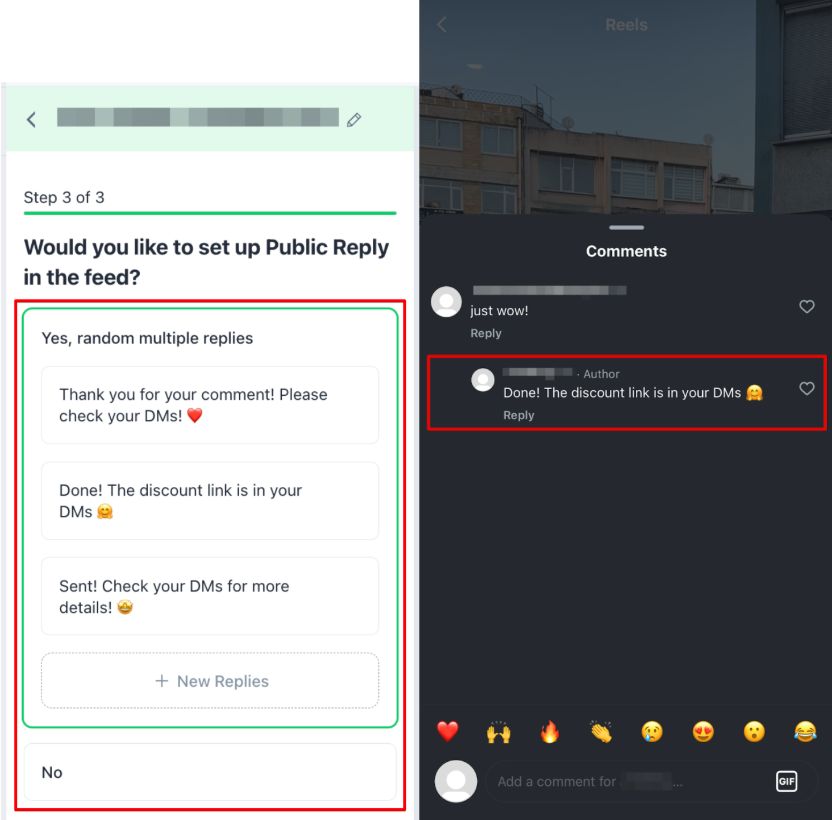
Manychat’s example of the optional public reply that can accompany a comment-triggered direct message. Source -
Collect one website request with the homeowner's timing Keep the checklist visible on the page.Ask for project details, optional photos and preferred timing.
Make the website form the owner of the request. Ask for service address, contact method, approximate cabinet scope and whether the homeowner wants an estimate now or is gathering information. Offer an unsure answer and optional wide kitchen photos. Explain that an estimator confirms the scope before preparing a final price.
For Tally uploads, set supported image types and a file-size limit your account accepts. Save the Reel campaign label with the submission and test office delivery. Keep optional future marketing choices separate from the request. Do not make the homeowner repeat the same photo intake in DMs.
-
Write the next follow-up from the submitted answer Route ready requests to the estimator.Give future planners a dated next action and useful preparation help.
Review the actual request and photos before assigning an estimate. For a homeowner planning later, ask which contact method and timing work for a follow-up. Record that answer with the request. A useful resource could explain how your company handles doors, access and kitchen downtime, using terms your crew can honor.
Use your CRM to create a task on the agreed date. If you use an automated email sequence, verify eligibility and stop conditions with a test. Instagram automation must stay within the applicable messaging window. Move later follow-up to a channel the homeowner has appropriately provided rather than scheduling a delayed DM outside that window.
-
Keep each project on one path to an estimate Stop nurture after a reply, booking or opt-out.Separate comments, submitted requests and attended estimates.
Before another message, check whether the estimator already spoke to the homeowner or booked a visit. Update the existing cabinet request with changed timing. Preserve the original Reel source and record what happened after the follow-up.
If PipelineOn is installed, available website matches can supply additional page context for review. Verify shared details before attaching a match to the submitted request. A matching visit does not establish which Instagram account commented. Count useful replies, estimate requests and attended visits from your office records.
What to measure
Review how many submitted cabinet requests reached the agreed follow-up date and a real estimate conversation. Use missing photos and changed timing to improve the checklist and tasks.