Use verified call context to prioritize window-estimate callbacks
Page history can help prepare a callback, but it cannot establish how many openings a customer wants replaced. Use the request and verified CRM details first. Assign one owner to the actual project.
Steps
-
Review the actual call timeline Save the call reference and sourceInspect available page context
CallRail's visitor tracking can associate website activity with a caller timeline. Open the specific missed or unresolved call.
The shared image is a documentation example. Preserve missing history as unknown and keep the original call record intact.
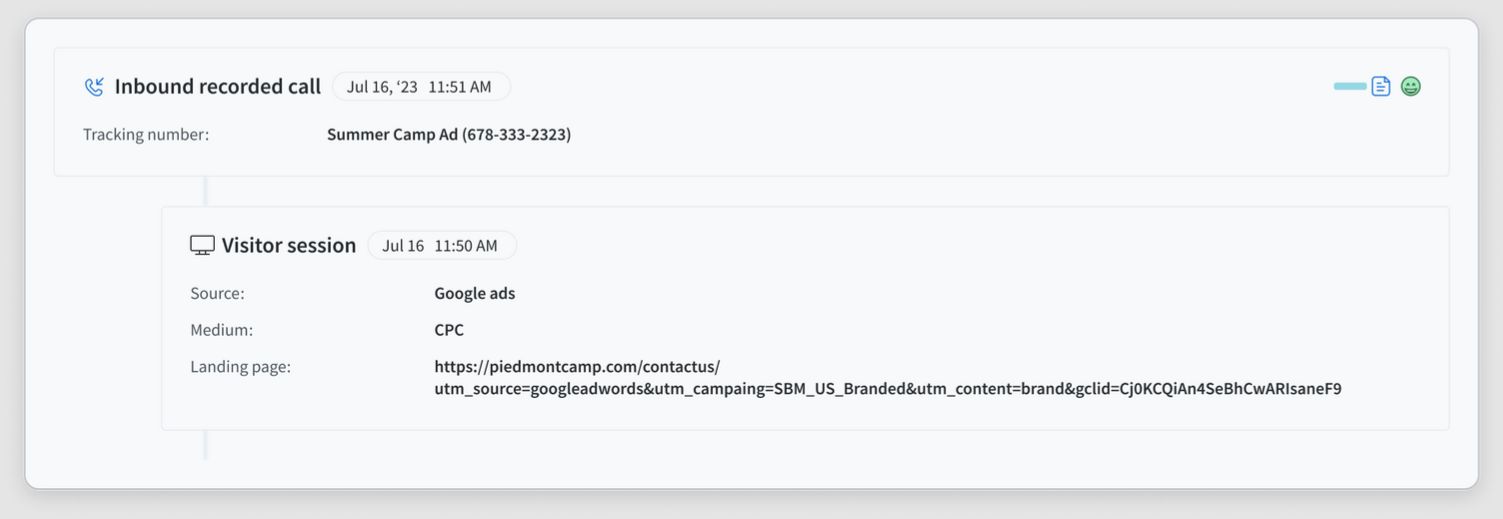
CallRail’s example of the visitor session attached to a tracked call. Source -
Verify the customer and project Check reliable shared contact detailsReview open quote and service history
Confirm the property with the caller. Look for active measurements, warranty work and existing proposals before creating another opportunity.
Keep weak joins separate. Similar timing or a shared household address does not prove who browsed or which opening the call concerns.
-
Prioritize the actual next action Use confirmed scope and timingGive each callback an owner
Ask what the customer wants assessed, approximate opening range if known and desired timing. Route technical questions to qualified staff.
Use page evidence to prepare a relevant question. Avoid assigning value or credit suitability from property fields.
-
Audit routing against completed measures Track uncertain joins and duplicatesMeasure attendance and actual outcomes
Review successful contacts, qualified requests, attended measures and completed installations. Keep repairs and replacement projects distinguishable.
Ask the estimator to review a small queue sample. Correct matching and intake failures before automating more aggressive priority rules.
What to measure
Start with manual review. Every callback reason should be explainable from a genuine request, verified history or clearly limited page context.