Test restoration AI reception when the on-call contact cannot answer
An after-hours assistant needs a working fallback when the on-call person is unavailable. Test the entire route. Reception can collect the report while authorized staff make urgent response and service decisions.
Steps
-
Approve the intake and escalation rules Name the on-call destinationSet a realistic unanswered fallback
Have the project lead approve questions and the actual situations requiring immediate human review. Record coverage and staffing hours.
Keep arrival times, technical advice and coverage conclusions outside unverified automated answers. Define who owns unresolved calls.
-
Check the published phone route Review forwarding and backup modeTest the number customers dial
HighLevel documents inbound routing and backup behavior. Compare the account configuration with your advertised contact arrangement.
Run an outside test call and inspect the actual destination. Voicemail or another route may prevent the intended assistant or person answering.
-
Test the failed-handoff case Use routine and urgent reported scenariosVerify ownership after failure
Run staff-controlled calls for an estimate, a reported active incident and an unanswered on-call contact. Save times and outcomes.
The shared CallRail timeline is an example. Inspect your real test call and callback record. A tracked call does not prove staff accepted response.
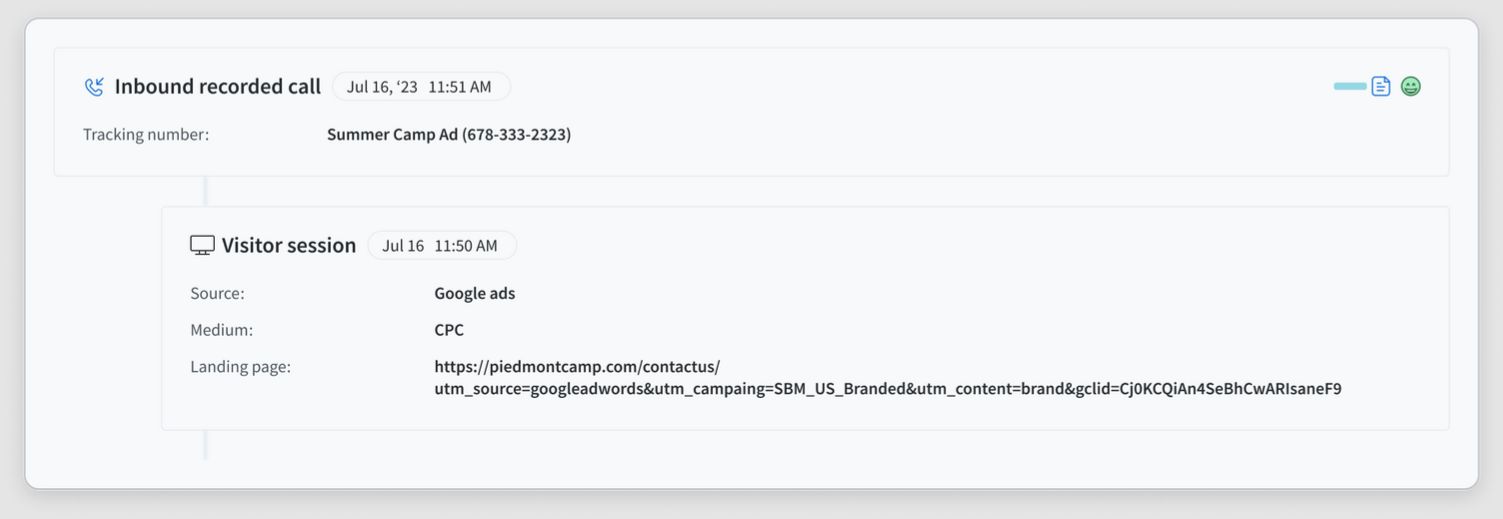
CallRail’s example of the visitor session attached to a tracked call. Source -
Close the loop at shift handover Assign every unresolved requestMeasure human contacts and attended visits
Give the daytime team the original report and explicit next action. Notify the customer using the accurate response process.
Track completed transfers, failed handoffs, callbacks and attended assessments. Review unsupported promises before promoting the route more widely.
What to measure
Repeat the scenario set whenever staffing or routing changes. A successful greeting is only the beginning of the incident handoff.