Route a repipe estimate reply to the right Pipedrive deal
A homeowner can reply to an old repipe email about a different plumbing job. Read the request before reopening the quote. Your office needs to decide which project changed and which estimator should own the next conversation.
Steps
-
Read the reply beside the original repipe scope Open the full reply and attached estimate.Ask which work the homeowner wants priced now.
Find the original repipe deal, quote version and service address. Read the homeowner's actual reply before changing status. A reply such as “We postponed the repipe. Can you quote the new bathroom supply lines?” needs a different scope review from a request to refresh the original estimate.
Confirm the property, requested work and urgency through the existing conversation. Record what the homeowner said and leave technical decisions with your estimator. Keep the old repipe opportunity in its accurate state while you establish the new request.
-
Check the person and the relevant pipeline separately Open the person's linked opportunities.Select the pipeline that owns the requested work.
Pipedrive allows one person to have multiple linked leads or deals. Use the contact record to find the customer's history, then inspect each relevant deal's scope and address. Sharing a contact does not make two plumbing projects the same opportunity.
In the deal pipeline view, use the pipeline selection dropdown to open the process your office uses for that work. The screenshot demonstrates this switcher. Review both the old estimate and any existing opportunity for the new scope before creating another deal. Visibility permissions can limit which pipelines a staff member can see.
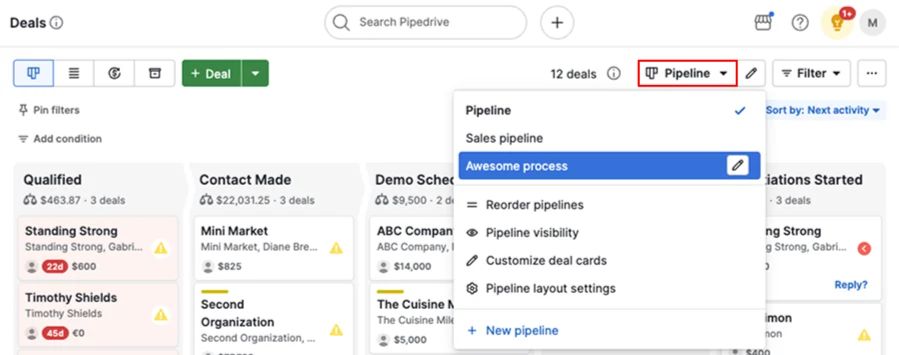
Pipedrive’s sample deal board shows the pipeline selector. Open the pipeline that contains the original proposal. Source -
Assign the reply to the project your estimator confirms Update the original deal when the project is the same.Use a distinct opportunity when the homeowner requests separate work.
If the homeowner still wants the repipe with a changed scope, keep the revision on that deal and preserve the old quote. For a separate job, use the existing person and link the appropriate new or already-open opportunity. Record why the office treated it as separate and assign one estimator with a due date.
Keep the email context available from the project record using the tools supported by your account, or add a clear note pointing to the conversation. Verify the association yourself. Do not assume that an email appearing on the person's history has been attached to the intended deal.
-
Count reopened repipes and separate jobs accurately Preserve the original source for each project.Use confirmed scope and appointment outcomes in the report.
Mark whether the reply reopened the repipe, created another plumbing project or simply answered a question. Count attended assessments and accepted quotes against the opportunity that actually received the work. A new bathroom job should not become a recovered repipe sale in the report.
With PipelineOn installed, a matched visitor's available page activity can add context after you verify the contact connection. The actual reply and deal records establish the requested scope. Keep ambiguous matches outside the opportunity and let the assigned estimator confirm the next step.
What to measure
Review replies that required a scope decision, corrected deal links and attended visits. Use the results to improve how the office assigns new requests from existing contacts.