Keep separate garage doors distinct when merging repeat inquiries
One property can have two doors with different openers and service histories. A repeated phone number cannot tell your office which one needs work. Identify the equipment before merging a request or assigning another technician.
Steps
-
Capture the actual door on every request Confirm property and door positionAsk whether this updates an open job
Ask for address, door position as described by the customer, requested work and any existing job reference. Keep opener details optional.
Record the caller's wording and let your team clarify uncertainty. Avoid instructions to operate damaged equipment just to identify it for intake.
-
Review contact and project records separately Find the verified existing contactOpen each potentially matching project
In Pipedrive, review linked deals and their equipment notes. The shared screenshot shows pipeline selection, not a garage-door equipment register.
Pipedrive's import guidance notes that deals do not have an automatic duplicate identifier. Have your office compare actual property, door and scope before merging or importing.
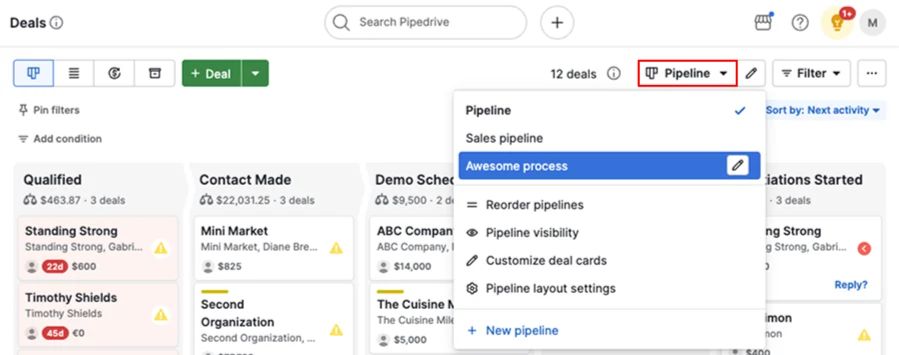
Pipedrive’s sample deal board shows the pipeline selector. Open the pipeline that contains the original proposal. Source -
Assign the right next action to the right door Keep separate equipment historiesCheck for an equivalent open task
Update the existing job when the inquiry concerns the same unresolved issue. Create separate work when the customer confirms another door or project.
Give one owner the service history, current report and equipment position. Keep billing contacts separate from the person arranging access.
-
Test repeats and separate-door cases Use one contact with two doorsInspect resulting tasks and visits
Submit controlled requests for left door, right door and a repeat about the left. Have dispatch identify which record each belongs to.
Review wrong-door assignments, duplicate tasks, repeat visits and completed jobs. Correct the matching rule before letting another automation create work orders.
What to measure
Keep the same-contact, two-door test with your CRM rules. Repeat it after changing intake fields, imports or job creation.