Record an electrical proposal option without counting a second sale
A customer chooses one option from your electrical proposal and asks for a revision. Your pipeline should show the chosen scope clearly without inflating accepted-job counts.
Steps
-
Identify the current proposal Confirm property and proposal versionAsk which option the customer means
Read back the option name or reference and what the customer wants changed. Do not infer acceptance from a vague email reply.
Preserve unresolved technical or commercial questions for the estimator. Record the customer's actual response date.
-
Update the project record Store the selected option explicitlyKeep superseded choices distinguishable
Pipedrive supports custom fields subject to permissions and plan limits. Use a selected-option field or an equivalent controlled project note.
The shared Pipedrive image shows the pipeline context. Verify the actual chosen scope and avoid creating a second deal solely for a revised option.
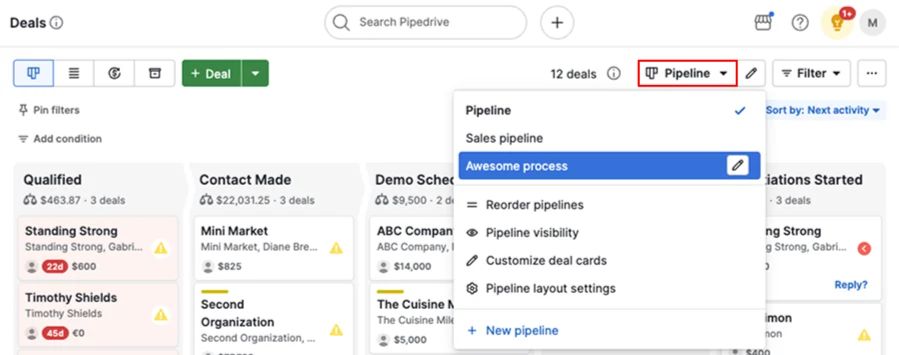
Pipedrive’s sample deal board shows the pipeline selector. Open the pipeline that contains the original proposal. Source -
Have the estimator confirm scope Review the requested revisionIssue the accepted document version
Have the electrical lead confirm which changes require a new proposal. Use your documented acceptance process before marking the job ready.
Tell the customer which document governs the next step and who handles remaining questions. Do not book production from an ambiguous option reply.
-
Reconcile sales and production Count one accepted projectCheck the production handoff
Review the selected version, acceptance evidence and production record together. Preserve genuinely separate properties as separate projects.
Measure option-related corrections and duplicate won deals. Test one rejected option and one revised acceptance through the full handoff.
What to measure
The pipeline should reflect the scope your team actually accepted. A revised option is a version decision within the project.