Keep electrical quote requests working when a panel photo cannot upload
A panel photo should prepare the assessment, not force someone to open equipment or abandon a request. Keep an unknown or no-photo route. Test the mobile submission before sending more traffic to it.
Steps
-
Approve the safe minimum intake Collect project goal and service propertyRequest only safely accessible existing views
Have the electrician define the contact and project information needed for a callback. Keep model and capacity answers optional when unknown.
Do not ask customers to remove covers, test equipment or enter unsafe spaces. Explain how the office follows up when a photo is unavailable.
-
Test the actual upload component Use realistic phone filesPreserve entered answers after failure
Test a normal image, a large image, unsupported format and no attachment. Check the error, retry and confirmation on a slower connection.
If using Tally, review current file-upload options and account limits. Verify the image opens for your electrician through normal account access.
-
Measure failed upload and accepted request separately Confirm the final event matches office intakeKeep personal content out of analytics
Have your web person define starts, upload errors and accepted requests. A clicked submit button alone should not fire the success event.
The shared PostHog image is a sample funnel. Build your own and reconcile accepted events with actual office records, with no photos or contact details in event properties.
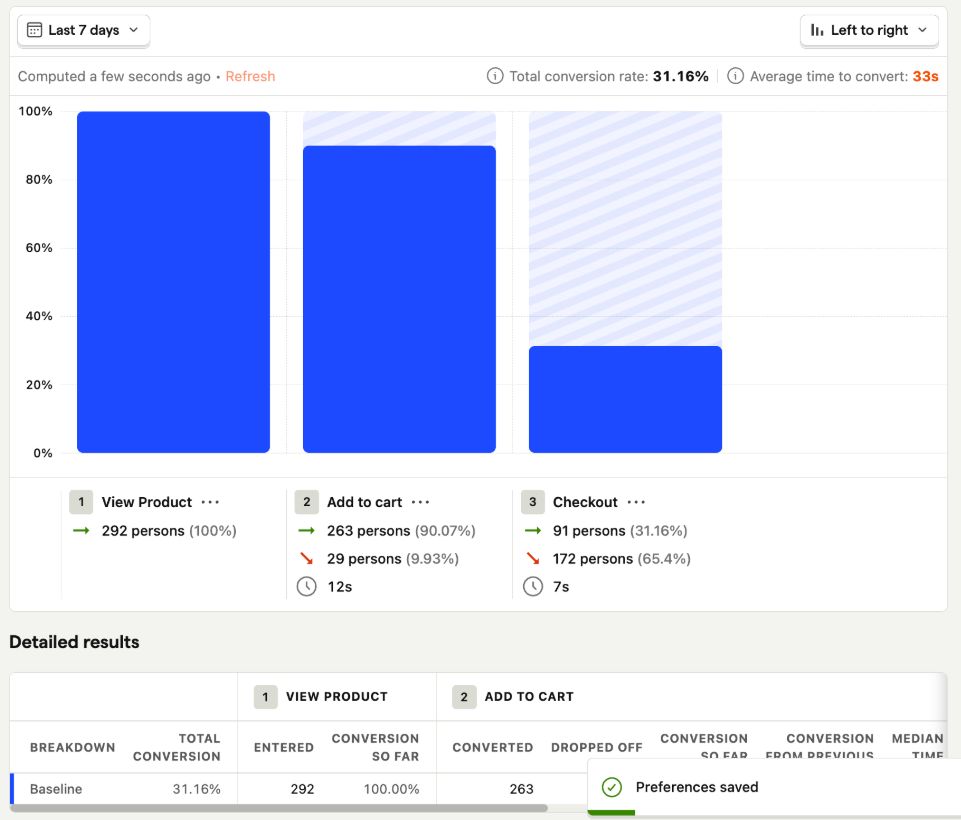
PostHog’s sample funnel. Substitute your page visit, form open and accepted request. Source -
Verify the no-photo callback and visit outcome Assign requests without images normallyTrack preventable assessment delays
Submit a no-photo test and confirm source, owner and customer acknowledgment. Ensure a retry does not create a second assessment task.
Track callbacks, attended surveys and delays caused by missing information. Add photo requirements only when the electrician can justify their actual usefulness.
What to measure
Save the failure and fallback tests with the form configuration. Rerun them when validation, uploads or office delivery changes.