Turn deck material Reel comments into useful sample appointments
Use a board-comparison Reel to learn what the homeowner needs from a material sample appointment.
Steps
-
Prepare the comparison sheet Use products you offerCheck supplier instructions
Have the supplier confirm product names and current care links. Explain which appearance questions samples help answer.
Let the builder review durability claims. Offer sample options your team can actually obtain.
-
Deliver the requested sheet Choose one Reel keywordTest the private reply
Configure the Manychat comment trigger. Use its optional public reply to explain where the sheet arrives.
Test from a separate eligible account and open the link. Continue under the current messaging rules.
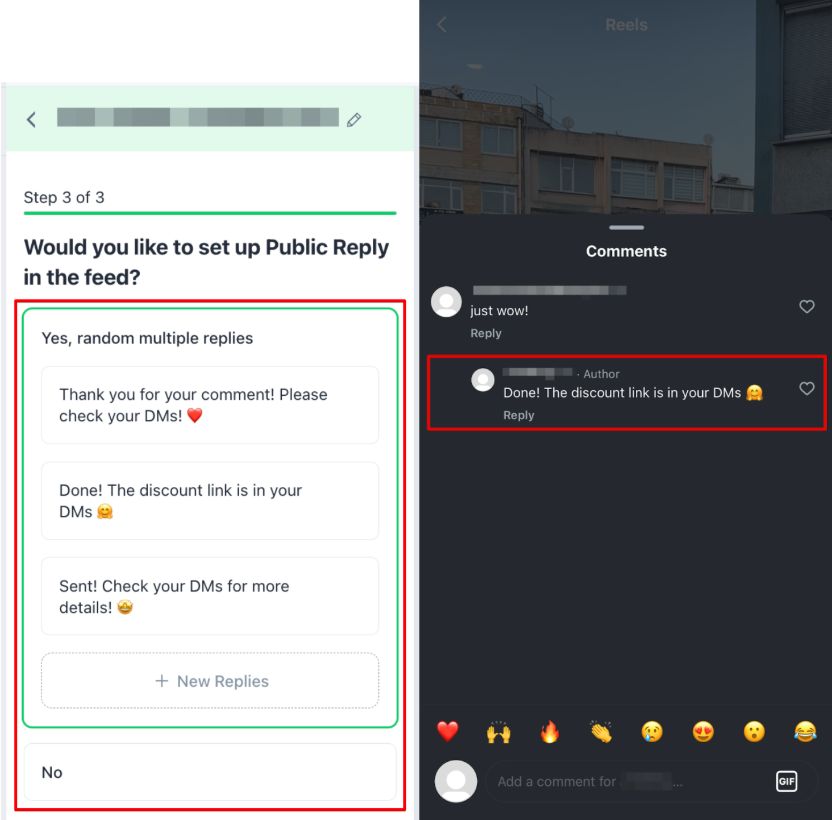
Manychat’s example of the optional public reply that can accompany a comment-triggered direct message. Source -
Prepare the sample visit Ask which products matterCheck sample stock
Record desired colors and whether this project already has a quote. A sample request is an early decision.
Give the coordinator the requested products, address and unresolved question before offering a time.
-
Save the material decision Log samples actually shownAssign supplier questions
Record the shortlist and the next question for the builder or supplier. Keep a selection reference with the project.
Count appointments producing a documented shortlist. Keep downloads separate from material approvals.
What to measure
A useful sample appointment leaves the builder with a documented material question or shortlist.