Use an Instagram moisture log to prepare basement assessments
A basement moisture log gives your inspector useful observations before a visit. Use Instagram to offer the worksheet, then invite interested people to request an assessment on your site. Keep observations separate from a diagnosis or a promise that one waterproofing method will solve the problem.
Steps
-
Publish a log your inspector approves Record where and when moisture appearsAsk about weather and prior workExplain how to request professional review
Build a simple page for dates, observed location, recent weather and the customer's description. Ask whether prior drainage or waterproofing work is known. Let unknown answers remain unknown and keep photographs optional.
University of Minnesota Extension explains that basement moisture problems require understanding where water comes from and how it enters. Use the log to support that investigation. Avoid presenting observations as proof of a specific foundation defect.
-
Deliver the promised resource from Instagram Use a relevant permitted imageConfigure the intended post triggerTest the private resource link
Invite viewers to comment LOG for the observation worksheet. Manychat's Instagram post and Reel comments trigger can start the reply path. Keep the first message focused on the resource the person requested.
The shared Manychat screenshot shows its public reply configuration example. Test your actual post, comment and private link with an eligible account. Follow current platform interaction rules before adding a reminder or another message.
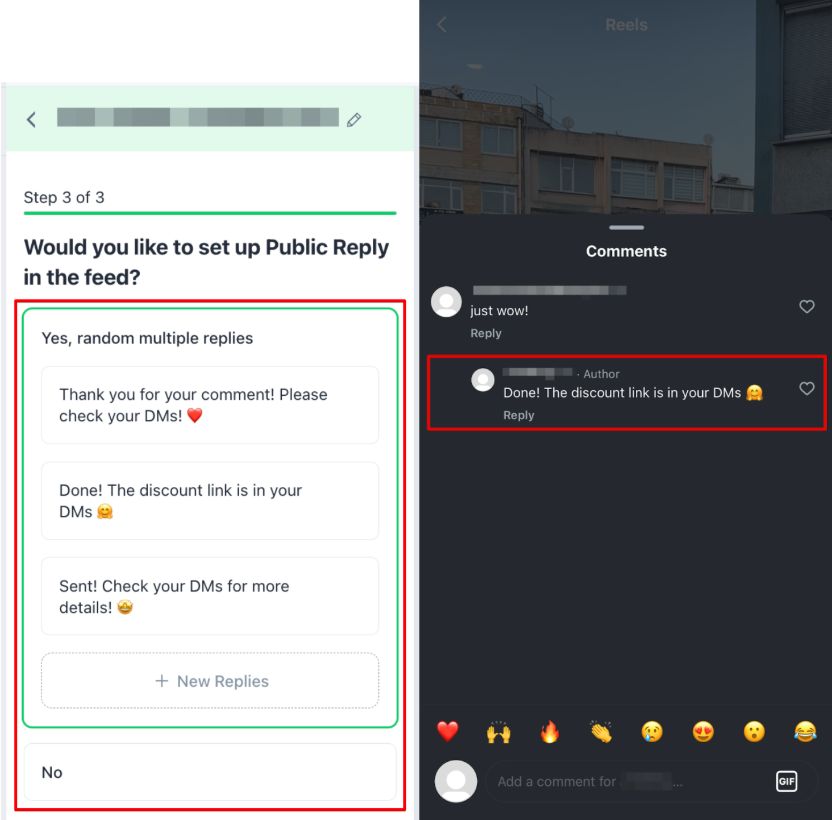
Manychat’s example of the optional public reply that can accompany a comment-triggered direct message. Source -
Give interested readers a separate assessment request Collect address and contact detailsAsk who can arrange accessSend active-water reports to staffed intake
Place a short request next to the log. Collect the service property, contact details and availability for an inspector callback. Explain when your office reviews requests and how someone reporting active water entry can reach the staffed route.
Have the coordinator check territory, existing work and an open estimate before assigning a visit. Keep the worksheet delivery separate from an explicit assessment request. Save the request whether it comes through the website form, an Instagram reply or a conversation with the office.
-
Measure useful assessments and accepted proposals Separate log delivery from inquiriesRecord attended assessmentsReview missing-information patterns
Track resource delivery, accepted requests, qualified appointments, attended assessments and accepted proposals. Preserve the Instagram source on the project record. Merge repeat submissions for the same property and issue after verifying the relationship.
Ask the inspector which observations helped and which questions confused customers. Improve the worksheet around actual intake gaps. Keep technical findings and recommended work in the professional assessment record.
If a PipelineOn match for the worksheet page agrees with an existing project record, use that context to help the estimator find the right earlier request. Build the assessment from reported observations. Keep worksheet-only visits out of the inspection count.
What to measure
Start with one worksheet and one tested post. The useful outcome is a homeowner who can describe what they observed and an inspector prepared to review it.