Use a basement contents planner to prepare accessible assessment visits
Give homeowners a short worksheet that tells the assessor which walls and floor areas may be blocked by stored belongings.
Steps
-
Build a visit-preparation planner Show what access helpsKeep moving instructions limited
Ask the assessor which areas need to be visible for an initial visit. Show those requests in plain language.
Let homeowners describe items they cannot move. Avoid asking them to handle heavy or potentially damaged materials for a marketing checklist.
-
Deliver the planner from Instagram Choose the relevant ReelTest the requested resource
Configure a Manychat comment trigger for the assessment-preparation Reel and offer the planner through the private reply.
Use the optional public response to explain delivery. Test the link and honor current messaging rules.
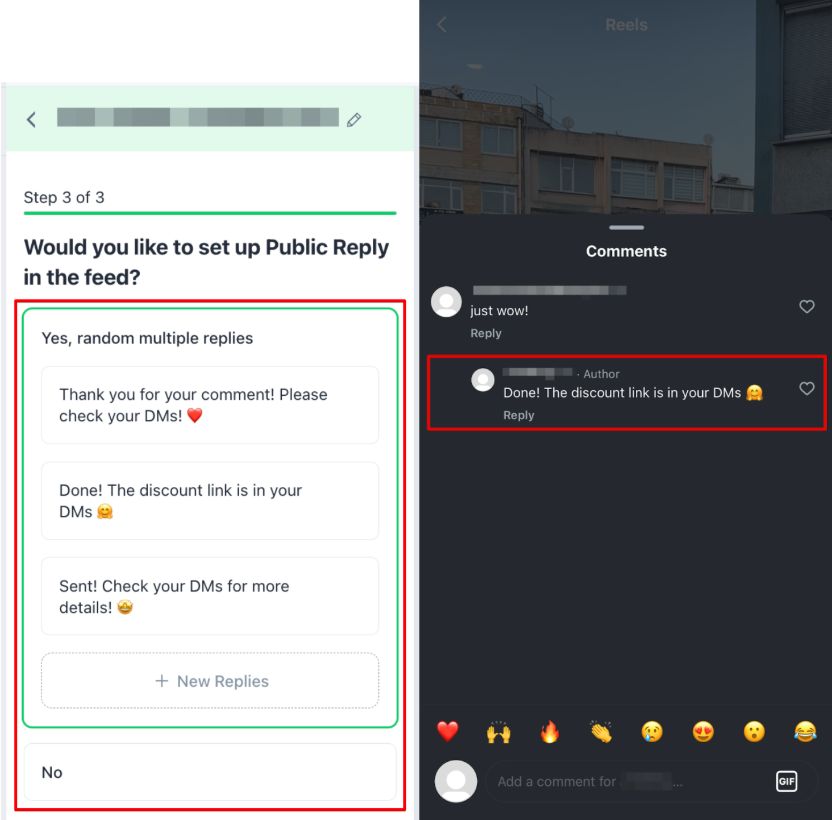
Manychat’s example of the optional public reply that can accompany a comment-triggered direct message. Source -
Review access before booking Ask which areas remain blockedLet the assessor choose the next step
Give the assessor the completed access notes and customer questions. Ask whether the planned visit remains useful.
The coordinator confirms any agreed preparation and records what the customer says they can do.
-
Check first-visit completion Record inaccessible areasUpdate unclear planner wording
Ask the assessor whether blocked access prevented the intended assessment. Keep that reason with the appointment.
Count visits completing the planned review and revise the preparation request causing repeat trips.
What to measure
The planner should help your team book a visit it can use.