CRM Recruitment Agencies: Your 2026 Selection Guide
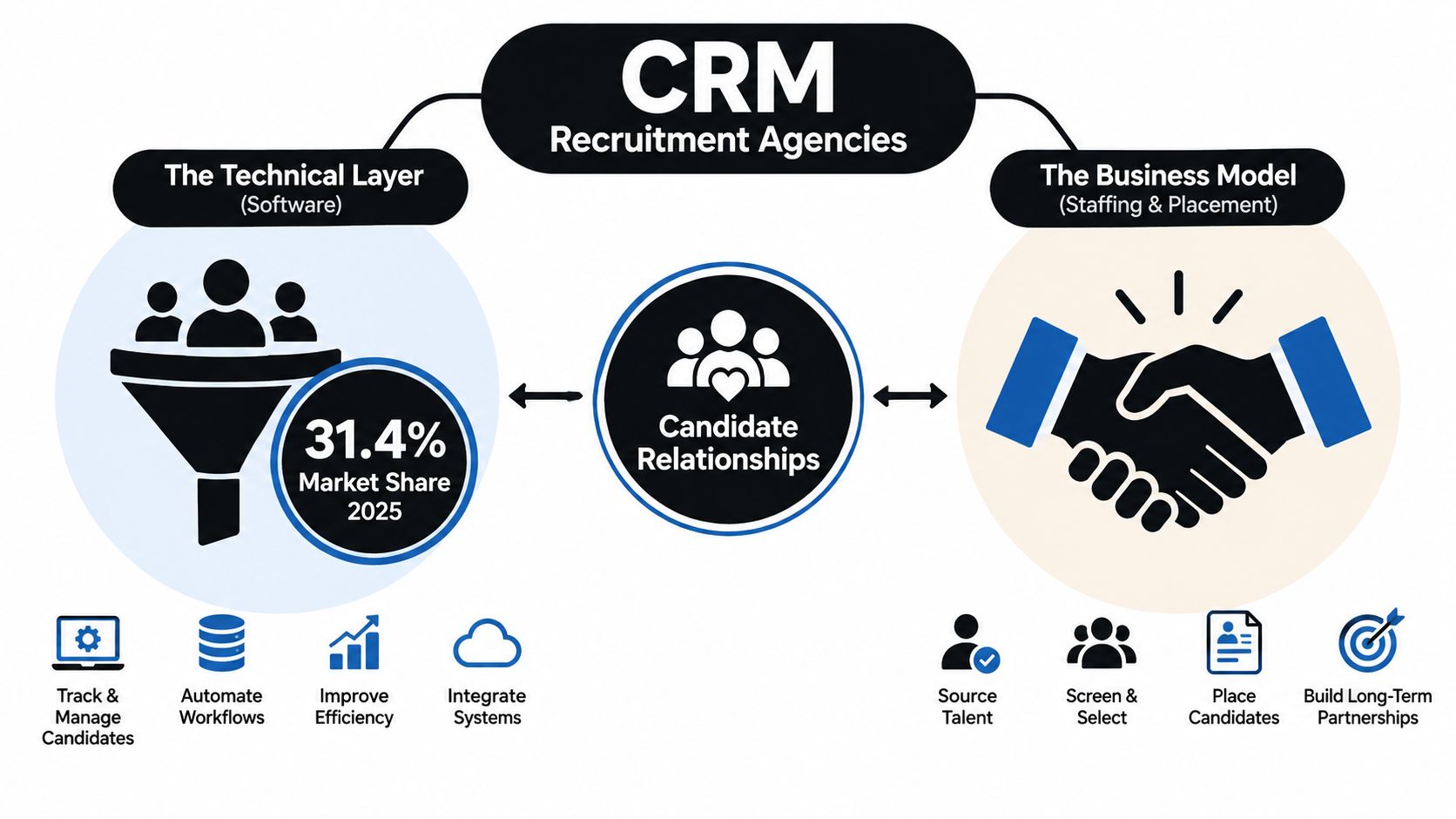
Recruitment agencies represented 31.4% of the candidate relationship management software market in 2025. “CRM recruitment agencies” can mean software agencies that serve recruiters, or recruiting firms that find CRM professionals, and those are two different buying decisions.
If you run a home service company, you may encounter both. One firm may sell or configure an agency CRM, while another may source a CRM administrator, Salesforce developer, HubSpot specialist, or implementation contractor for your office. Search terms such as agency CRM software and recruiter fees often lead to the same pages, even though the contracts, risks, and success measures differ.
The mistake is choosing on brand familiarity alone. Score the workflow, inspect the data controls, define candidate ownership, and put payment triggers in writing. Your crew needs a system and a supplier that produce faster, cleaner hiring decisions.
Table of Contents
- What CRM Recruitment Agencies Actually Mean
- How the Staffing Industry Built the Case for CRM
- Core CRM Workflows Every Recruitment Agency Runs
- Choosing a CRM or Vetting the Agency That Sells It
- Fee Structures, Replacement Guarantees, and Contract Terms
- Diagnose Before You Buy the Next Tool
- Calculating CRM ROI for a Recruitment Agency
- AI Governance, Consent, and the Final Checklist
What CRM Recruitment Agencies Actually Mean
The phrase has two practical meanings.
First, CRM recruitment agencies can refer to firms that sell, configure, integrate, or resell software built for recruiting businesses. Their clients are staffing firms, executive-search firms, and internal talent teams. The buyer journey starts with a process audit, moves through demos and migration planning, and ends with user adoption, reporting, and ongoing support. If you’re searching for CRM software for contractors, you’re evaluating the technical side of the phrase.
Second, it can describe recruitment firms that source people who work with CRM systems. These firms find CRM administrators, Salesforce developers, HubSpot specialists, implementation managers, and related technical staff. Their buyers include home service businesses that need someone to maintain customer records, connect field-service tools, manage automations, or lead a system rollout. The buyer journey focuses on role definition, candidate quality, fee terms, replacement protection, and ownership of submitted candidates.
The distinction matters because a software supplier can deliver a functional platform while leaving you without the person who can operate it. A talent agency can place a capable CRM administrator while your data remains split across spreadsheets, inboxes, and disconnected tools. Each side needs a different scorecard.
Practical rule: Decide whether you’re buying software, hiring CRM talent, or doing both before you accept a proposal.
The market context explains why the phrase creates confusion. Recruitment agencies accounted for 31.4% of candidate relationship management software activity in 2025, according to the candidate relationship management software market estimate. Agencies manage recurring relationships among candidates, employers, vacancies, and placement outcomes, so a searchable relationship history has commercial value beyond a one-time application.
How the Staffing Industry Built the Case for CRM
Staffing started with paper files, card indexes, personal notebooks, and the recruiter’s memory. That model worked while a desk depended on a limited local network. It failed when agencies needed to search old applicants, reconnect with passive candidates, and manage several clients with overlapping vacancies.
The industry’s modern origins are generally traced to the Industrial Revolution in the mid-1800s, when factory expansion created sustained demand for workers and encouraged intermediaries to connect employers with available labor. The first private, for-profit staffing agencies appeared in the 1890s, including the Engineer Agency, founded in 1893 by Frederick Winslow Taylor. Staffing demand expanded during both World Wars as military mobilization created shortages in civilian workplaces. In 1946, William Russell Kelly founded Russell Kelly Office Service in Detroit, which later became Kelly Services. These historical points are documented in this history of staffing research.
Executive recruitment developed separately from management consulting and expanded internationally during the 1950s and 1960s, as American multinational companies sought managers for overseas operations. The business model required relationship memory. A candidate who wasn’t right for one position could fit a later brief, and a client that hired once could return repeatedly.
The database replaced the personal Rolodex
By the late 1970s and early 1980s, candidate databases began replacing exclusively paper-based records. Agencies gained the ability to search prior applicants and reactivate talent instead of starting every search from zero. Online job boards and digital search accelerated that shift in the 1990s, making centralized, searchable relationship data a basic operating requirement.
The job-board era encouraged transactional behavior. Recruiters chased applications, copied resumes into separate files, and managed follow-up manually. Dedicated recruitment CRMs later gave agencies a shared history of candidate conversations, client requirements, submissions, interviews, and placements.
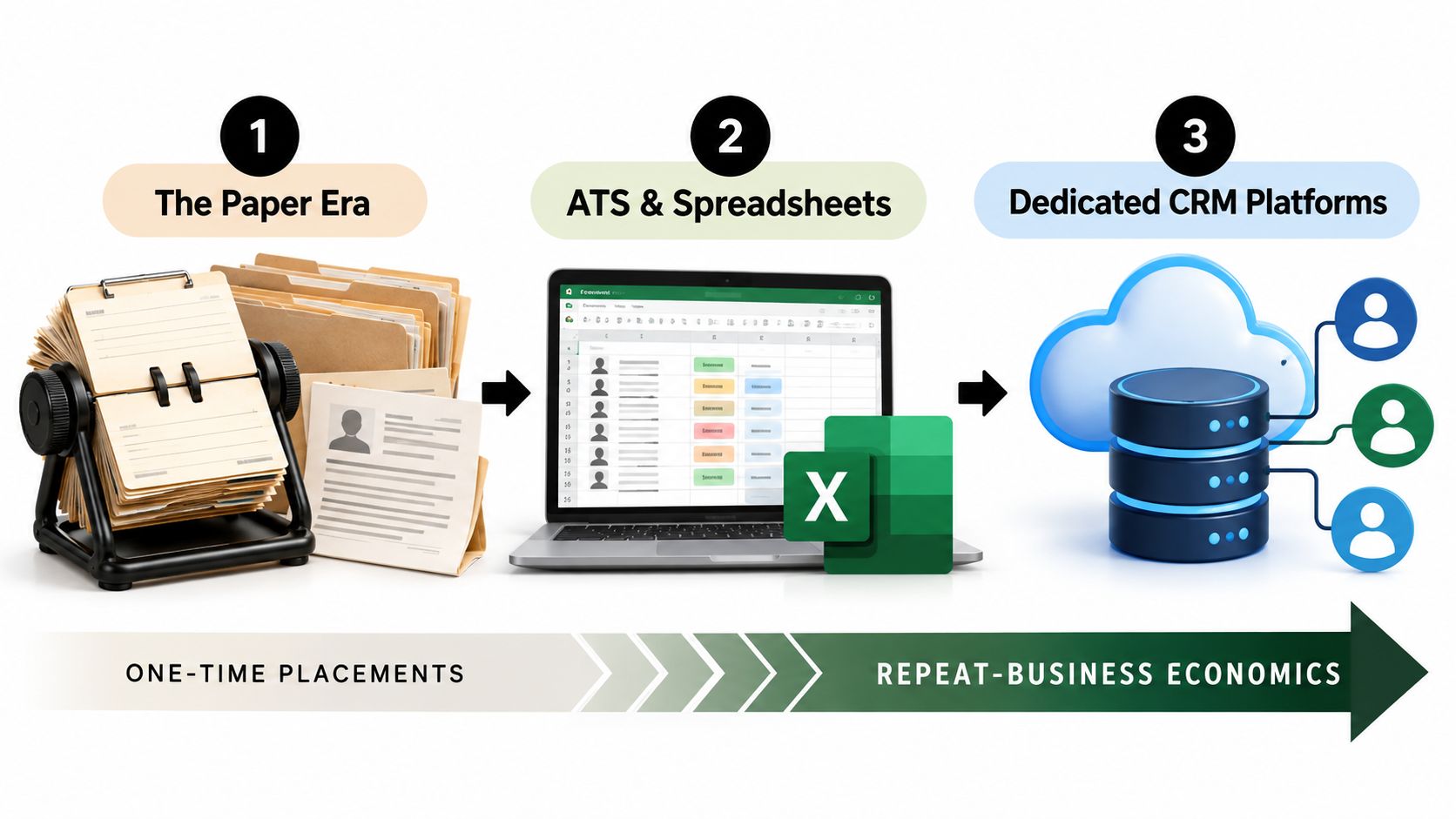
For a small agency, that history is a competitive asset. A five-desk boutique can recall prior candidates, preserve client preferences, and respond quickly when a familiar role opens. The CRM earns its place when it protects institutional knowledge and turns previous conversations into future placements.
Core CRM Workflows Every Recruitment Agency Runs
A working recruitment CRM should follow the agency’s actual movement of people and money. Start with candidate capture. A resume arrives through a job board, referral, inbound form, sourcing activity, or a recruiter’s direct contact. The system should parse the resume into structured fields, preserve the original document, record the source, and assign ownership.
Next comes deduplication. The same person may appear under a personal email, a work email, an old phone number, or a slightly different name. Require fields that support matching, merge duplicate profiles at ingestion, and preserve consent and activity history during the merge. A large contact count means little if recruiters can’t tell which record is current.
Candidate reactivation
Take a dormant candidate who was considered for a role in the past. A recruiter can filter the database by skill, seniority, location, prior role, and last activity, then review whether the person’s consent and preferences support renewed contact. The CRM can create a personalized message, schedule a follow-up task, and log replies in the candidate timeline.
Automation should handle repeatable state changes. A recruiter should still decide whether the person fits the new role, whether the message is appropriate, and whether the relationship deserves a direct call. If you use external prospecting support, resources for cold callers can help you separate list-building and first-touch work from candidate qualification.
Client submission and placement
The client-side workflow begins with role intake. Capture the job requirements, fee arrangement, submission rules, hiring contacts, and expected milestones. The recruiter then creates a longlist, narrows it to a shortlist, submits candidates, records client feedback, schedules interviews, manages offers, and closes the placement.
A good pipeline shows more than a green or red status. It shows who owns the next action, when the last contact occurred, what the client said, and which candidates remain available. Post-placement check-ins protect the client relationship and create opportunities for redeployment or future hiring.
Back-office movement
Temporary and contract desks need an additional loop. The CRM may support contract generation, timesheet capture, pay and bill information, and invoice triggers. Permanent-placement agencies may need less back-office depth, but they still need placement-fee tracking and a reliable handoff to finance.
Every action produces measurement data. Track duplicate-record rate, mandatory-field completeness, active-to-inactive profile ratio, database utilization, time to first candidate submission, submission-to-interview ratio, interview-to-offer ratio, and offer-to-placement ratio. The recruitment database guidance from Recruit CRM connects these measures to search precision, pipeline conversion, and recruiter capacity.
Choosing a CRM or Vetting the Agency That Sells It
Score the supplier against your workflow instead of allowing a polished demo to make the decision. Ask the same questions of every vendor, record the answers in a spreadsheet, and test the highest-risk process with real, sanitized records.
If you’re buying a CRM platform
Demand an open API, webhook documentation, and bulk export in both CSV and JSON. Require a documented data-retention policy, role-based access controls, SSO, security evidence such as SOC 2 or ISO 27001 documentation, and a sandbox tenant for evaluation.
Then test the workflow depth. Can the platform handle longlists, interview scheduling, submission status, offer management, and post-placement check-ins? Can it distinguish candidate ownership from client ownership? Can it preserve source attribution, consent status, and activity history when data moves between systems?
Use a representative workflow rather than a generic demo. Import duplicate records, change ownership, export the database, revoke access, and inspect the audit trail. If the vendor won’t let you test these actions, treat that refusal as a commercial risk.
If you’re hiring a CRM recruitment agency
Ask who will run the search. Require named references and recent placement details for the senior recruiter who owns your engagement. A logo wall proves that the firm has sold services, not that the assigned recruiter can find your CRM administrator or implementation specialist.
The supplier should report candidate source, submission date, status, and next action. Put the performance window, communication cadence, replacement remedy, and candidate ownership terms into the agreement. Your company should retain access to candidate records and relevant hiring documentation when the engagement ends.
| Criterion | Buying a CRM Platform | Hiring a CRM Recruitment Agency |
|---|---|---|
| Proof of fit | Sandbox workflow using representative records | Named references and relevant CRM placements |
| Data control | Export in CSV and JSON, API access, retention policy | Candidate records, submission history, and ownership terms |
| Operational depth | Submission through placement, plus reporting | Sourcing, qualification, interviews, offer management |
| Security and governance | Role controls, SSO, security evidence, audit logs | Consent handling, confidentiality, and data-access limits |
| Performance evidence | Adoption, search quality, conversion, and speed metrics | Source reporting, response cadence, and agreed performance window |
Before selecting a product, use a structured guide to compare recruitment CRM platforms, then run your own test. Vendor rankings don’t replace a workflow check.
Fee Structures, Replacement Guarantees, and Contract Terms
The fee model determines when cash leaves your business and who carries the risk of an unsuccessful search. For a home service company hiring a CRM administrator, implementation specialist, or CRM sales recruiter, read the payment trigger before you debate the headline percentage.
Contingency search
Contingency agencies charge after you hire their candidate. A common range is 20% to 25% of first-year cash compensation, so a $70,000 CRM hire produces a fee of $14,000 to $17,500. Confirm whether the percentage applies to base salary only or total first-year cash compensation, including commissions and bonuses. The definition changes the invoice.
A contingency recruiter can usually present candidates to multiple employers. Candidate ownership therefore needs a precise rule. Identify the candidate, record the submission date, and define how long the recruiter controls the fee claim. For a $60,000 hire at the cited 15% to 25% range, the fee equals $9,000 to $15,000, as explained in this recruiting agency selection guide.
Retained search
Retained search uses an exclusive engagement and milestone payments. A common fee is about 33% of first-year compensation. For a $90,000 CRM manager search, that totals about $29,700, or approximately $9,900 at each of three milestones: engagement, candidate presentation, and offer acceptance. The retained recruiter cost breakdown shows why seasonal businesses need to plan for the first payment before a hire exists.
Use retained search for a senior, confidential, or difficult role. State whether a failed search produces a refund, credit, or additional work without another fee.
Clauses to insist on
A replacement guarantee commonly covers a resignation or termination within three to six months. The remedy is usually a replacement search without another placement fee, but exclusions matter. A changed job description, redundancy, incapacity, or a hire through another agency may remove the protection.
| Model | Typical Fee | Payment Schedule | Replacement Guarantee | Contract Clauses to Insist On |
|---|---|---|---|---|
| Contingency | 20% to 25% of first-year cash compensation | Payable after a successful hire | Define the period and qualifying departure | Candidate submission date, ownership window, payment trigger, refund or replacement remedy |
| Retained | About 33% of first-year compensation | Engagement, presentation, and offer milestones | Define the period, remedy, and exclusions | Refund or credit formula, search deliverables, milestone conditions, ownership return |
| Hybrid or engaged | Negotiate a fixed engagement component and success fee | Part upfront, balance on agreed event | Define the period and remedy | Scope, candidate ownership, reporting, termination rights, non-solicit limits |
Define when the guarantee clock starts, how quickly you must notify the agency, and whether the remedy is a replacement, refund, or credit. Require the agreement to return the candidate database when the engagement ends. Keep any non-solicit limited and commercially reasonable. For additional replacement guarantee recruiting insights, focus on the written exclusions rather than the sales promise.
Diagnose Before You Buy the Next Tool
A slow desk doesn’t automatically need a new CRM. It may need clean records, consistent qualification, or a manager who enforces follow-up. Buying software before identifying the constraint gives your crew another place to avoid doing the work.
Run this audit before requesting demos.
Inspect the database
Search for duplicate candidate records, missing emails, stale profiles, and inconsistent job titles. Identify candidates older than 18 months with no activity, then separate dormant relationships from people who should be archived. Check whether consent status, source, owner, and last-touch date survive a merge.
If the database is dirty, fix the import rules and ownership process first. A new interface won’t improve a search built on unreliable records.
Inspect the process
Take recent submissions and ask four questions. Was each submission logged? Does it have a clear status? Is an owner assigned? Does the record show the last touch and next action?
Private spreadsheets expose a management problem. Recruiters may use them because the central process is slow, unclear, or poorly designed. Establish the required fields and stage definitions, then audit compliance before you blame the CRM.
Inspect the measurements
Track time-to-submit, time-to-interview, and time-to-offer. Add submission-to-interview and interview-to-offer conversion, then report by recruiter, source, specialty, and client. Placement count alone hides where the pipeline breaks.
Inspect incentives
Review how you pay recruiters. A compensation plan based only on placements can discourage long nurture work, database maintenance, referrals, and redeployment. Measure the work that creates future placements, not only the final event.
A CRM is the bottleneck only after your records are usable and your workflow is measurable.
Before migrating, document field mappings, duplicate rules, consent history, ownership, and rollback steps. This CRM migration guide provides a useful framework for protecting records during the change.
Calculating CRM ROI for a Recruitment Agency
Calculate return from incremental placements, not login counts, email volume, or records stored. The basic equation is simple:
Incremental placements × average fee per placement, minus software, implementation, data cleaning, and training costs = first-year contribution.
Use conservative assumptions. Count only placements your existing operation could not reasonably have produced without the change. Separate permanent placement revenue from temporary-desk margin, and include the labor required to clean and govern the database.
Build the calculation
Start with your average fee per placement. Add the number of additional placements you believe the workflow can support. Then subtract recurring software cost, one-time implementation cost, migration labor, and training at loaded labor cost.
| Line item | Assumption | Annual $ |
|---|---|---|
| Incremental placements | Additional placements attributable to the workflow | Your figure |
| Average fee per placement | Use your actual average fee | Your figure |
| Gross placement upside | Incremental placements multiplied by average fee | Calculate |
| Software | Seats, modules, integrations, and support | Vendor quote |
| Implementation | Configuration, migration, and testing | Proposal amount |
| Training | Employee hours multiplied by loaded labor cost | Your figure |
| Data cleaning | Internal or outsourced preparation | Your figure |
| Net first-year contribution | Gross upside less all first-year costs | Calculate |
Test the assumptions that usually make a forecast look better than reality: ramp time, candidate reactivation conversion, discounts, unfilled roles, and recruiter adoption. Record actual results weekly instead of waiting for year-end.
Track three leading indicators: candidates re-engaged, submittals per requisition, and time-to-shortlist. Add administrative hours, placements per consultant, and revenue per consultant to connect activity with commercial output. The benchmark cited in this recruitment agency productivity guide reports that executive recruiters spend approximately 35% to 40% of their week on non-fee-generating work and that firms with clean, actively maintained CRMs close searches 15% to 20% faster than firms with degraded databases.
For a finance partner who dislikes software subscriptions, show the defensive cost of a lost client relationship. A system that preserves client preferences, recruiter history, and candidate recall protects future opportunities that won’t appear in a simple monthly expense comparison. Use the CRM ROI calculator to structure the inputs, then replace every default with your own operating data.
AI Governance, Consent, and the Final Checklist
Treat AI features as contract and governance issues. A vendor demo may show resume parsing, sourcing signals, ranking, personalized outreach, or candidate attribution as one smooth experience. Your review should separate those surfaces because each one creates different risks around consent, explainability, data provenance, and human responsibility.
Recent recruitment research reports that 65% of recruiters use AI to augment recruiting technology, while only 49% of organizations have formal AI-governance policies and another 38% are piloting them. The same research reports that 44% of recruiters consider meeting diversity goals their biggest challenge and that 50% plan to use technology to diversify talent pools or reduce bias. Review the Recruiter Nation research before approving automated ranking or outreach.
Put the controls in the agreement
Require a model-training opt-out, documented data residency, a current sub-processor list, and breach notification within 48 hours. Require audit logs for automated actions, retention controls, opt-out handling, and a clear description of human review thresholds.
Before signing, confirm:
- DPIA completion, where your privacy process requires one.
- Candidate-facing AI disclosure language.
- Consent status stored with every candidate record.
- Source and attribution history preserved through synchronization.
- Vendor SOC 2 report or equivalent security evidence reviewed.
- Model-training opt-out recorded in the contract.
- Data residency and cross-border transfer terms documented.
- Sub-processors disclosed and kept current.
- Human review threshold defined for ranking and rejection.
- Bias testing planned by demographic and role segment where lawful and appropriate.
- Rollback plan approved for biased or inaccurate outputs.
- Named internal owner accountable for AI governance.
Also resolve the recruitment contract before activating automation. Confirm candidate ownership, replacement protection, notice periods, and the remedy for early turnover. Automated contact should support a recruiter’s judgment, not erase it. Measure conversions alongside complaints, opt-outs, response quality, and inaccurate matches.
Pipeline On helps home service contractors identify and follow up with website visitors who don’t submit a form, then sync those contact records with tools such as ServiceTitan, Housecall Pro, Jobber, HubSpot, and Pipedrive. Visit Pipeline On to see how its lead identification, automated follow-up, Hot Pages, and ROI reporting can support a cleaner contractor sales pipeline.
Written by
Pipeline Research Team