Anatomy of an Email: Marketing Playbook for Contractors

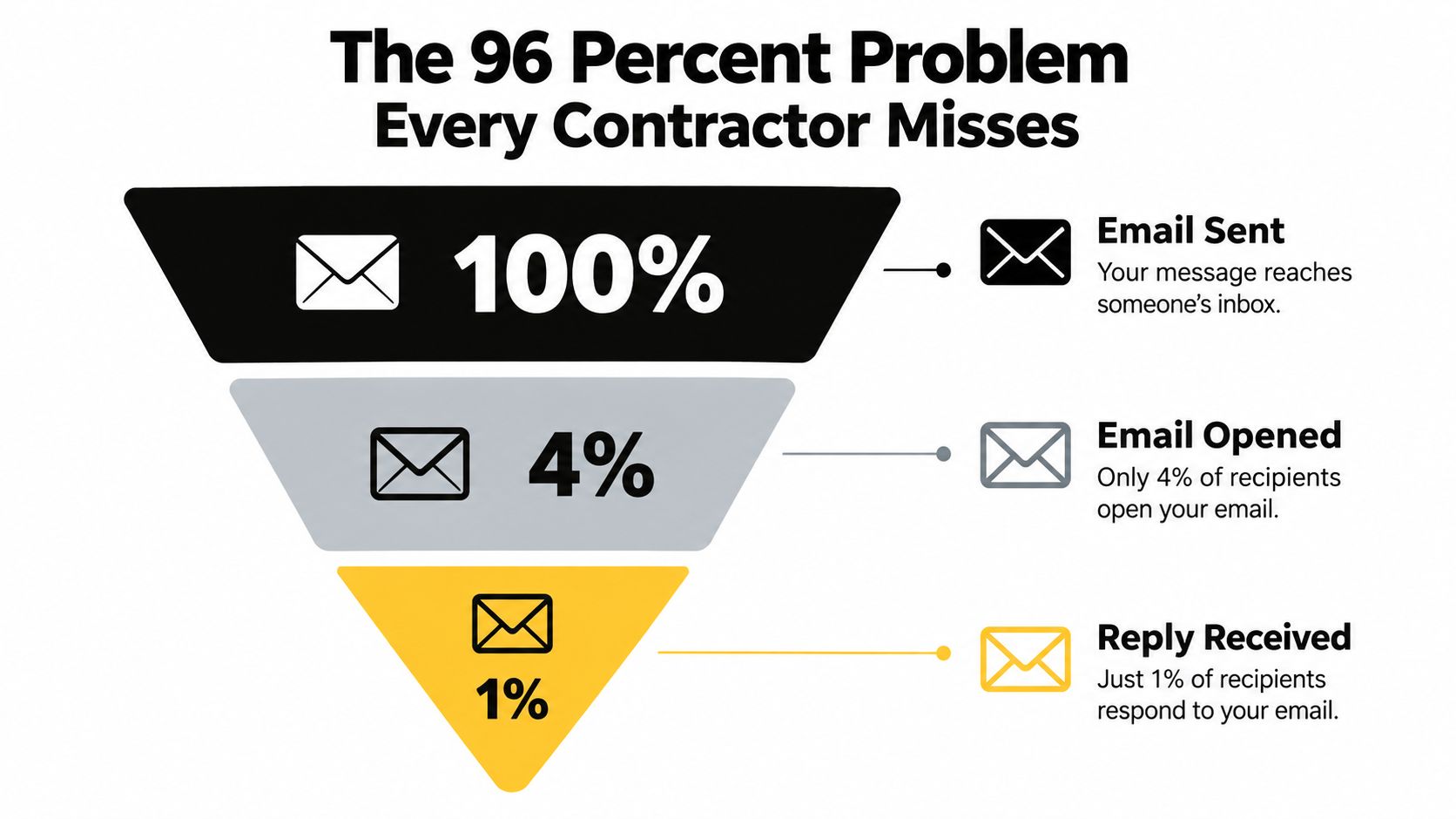
Contractors using Pipeline On report recovering 96 percent of anonymous visitors and multiplying lead volume by 10x or more from existing ad spend and website traffic. The anatomy of an email determines whether those recovered visitors reply, book, or disappear after one glance.
Home service inboxes are crowded. A projected 392.5 billion emails will be sent and received worldwide every day in 2026, compared with 281.1 billion in 2018 and 361.6 billion in 2024, according to global email usage data. Your homeowner doesn’t see your message in isolation. Your email sits beside appointment reminders, invoices, promotions, school notices, and every other business asking for attention.
That makes structure a sales issue. A contractor email needs a visible path from recognition to trust to action, backed by technical layers that help it reach the inbox in the first place. The subject line earns the open, the body earns confidence, and the CTA makes booking simple.
Table of Contents
- The 96 Percent Problem Every Contractor Misses
- Visible Anatomy of an Email Breakdown
- Subject Lines That Get Opened by Homeowners
- Invisible Technical Layers That Control Deliverability
- Complete Email Templates for Each Trade
- Tracking Your Emails with Pipeline On
- Your Email Anatomy Action Plan
The 96 Percent Problem Every Contractor Misses
A 96 percent drop-off can separate an email send from a homeowner reply. For contractors, that gap represents more than weak engagement. It can mean a missed appointment, an unquoted repair, or a homeowner calling the competitor who made the next step clearer.
A homeowner may visit your website after searching for a leaking pipe, a dead furnace, or storm damage. They read the service page, check your reviews, and leave without calling. If your process never identifies or follows up with that visitor, the opportunity ends before an estimator can respond.
The same failure happens after an email open. Your message may look professional, yet the homeowner scans the first paragraph and closes it. The email has not answered the questions that determine whether they reply: Why are you contacting me? Can you solve this problem? How quickly can you help? What should I do next?
Contractors using Pipeline On report recovering anonymous visitors and multiplying lead volume from existing ad spend and website traffic. Identification creates an opportunity, but email anatomy converts attention into a conversation. Every visible element must move the reader toward a practical response without making the message sound aggressive.
Inspect the leak before blaming the lead
A weak contractor email usually loses the homeowner through several small problems:
- The subject hides the reason for contact: “Special Offer Inside” provides no useful context for someone dealing with a real home issue.
- The opening paragraph leads with your company: The recipient still does not know what you can do for their house.
- The CTA demands too much effort: “Learn More” sends the homeowner to a general website instead of a clear booking action.
- The footer looks incomplete: Missing business details or unclear unsubscribe controls weaken trust.
- The timing feels random: A follow-up sent long after a service-page visit loses the urgency that created the original interest.
Review the message like a field inspection. Check the roofline, foundation, wiring, plumbing, and safety systems instead of approving the front door alone. Your email needs the same discipline. Its visible components should work together, while authentication and other technical layers support delivery.
Practical rule: Before the CTA, answer why you contacted the homeowner, why your company is credible, and which action takes the least effort.
Your crew does not need more words. It needs fewer obstacles. A homeowner with an active problem wants clear help from a credible local contractor, followed by a direct way to schedule.
Visible Anatomy of an Email Breakdown
A contractor email has six visible working parts, from the inbox preview to the footer. Each part should make the next decision easier for a homeowner who is already comparing local companies.
The inbox-facing components
Subject line: Name the service, problem, or next step early. Lines between 30 and 50 characters achieve the highest open rates, while lines over 60 characters are frequently truncated on mobile devices and can look promotional, according to subject-line deliverability guidance. “Roof damage after the storm?” gives a homeowner more useful context than “Special Offer Inside.”
Preheader: Add information that the subject does not contain. For example, pair “Furnace check for {{Address}}” with “Two appointment windows are available this week.” Keep the preheader between 40 and 130 characters, while remembering that mobile clients often show only the first 30 to 55 characters, as explained in preheader length guidance. The first words should carry the message in case the rest is cut off.
Header: Use a logo, service photo, or restrained design element to identify your company. A large image can push the booking option below the first screen, and a generic stock photo makes your crew look interchangeable. Use a real truck, team member, completed project, or clean brand mark when it supports the job being discussed.
Body: Start with the homeowner’s situation, then explain what your crew can do. Use plain service language and one proof point, such as your service area, warranty, licensing information, or current availability. A short explanation of the repair usually earns more attention than a company history.
Call to action: Match the CTA to the job’s urgency and ask for one action. “Book a furnace inspection,” “Request a roof assessment,” and “Call for emergency plumbing help” tell the homeowner what happens next. “Learn More” makes them choose the next destination themselves. Link the button to the booking form, phone number, or service request that matches the promise.
Footer: Show your company name, physical mailing address, contact details, and a visible unsubscribe option. Commercial messages must use accurate header information and nondeceptive subject lines. CAN-SPAM guidance states that senders must honor opt-out requests within 10 business days, and the opt-out mechanism must remain available for at least 30 days after sending.
| Component | Best Practice | Common Mistake |
|---|---|---|
| Subject line | Name the service or homeowner problem | Using vague promotions |
| Preheader | Complement the subject with a useful detail | Repeating the subject |
| Header | Support recognition without dominating the screen | Leading with a large generic image |
| Body | Explain the problem, solution, and proof | Writing a long company biography |
| CTA | Ask for one clear booking action | Linking to a general homepage |
| Footer | Show business identity and opt-out controls | Hiding required details |
Test the message with images blocked and on a narrow mobile screen. Check the plain text, every link, the button destination, and the content visible before scrolling. A polished design cannot compensate for a broken booking path.
Subject Lines That Get Opened by Homeowners
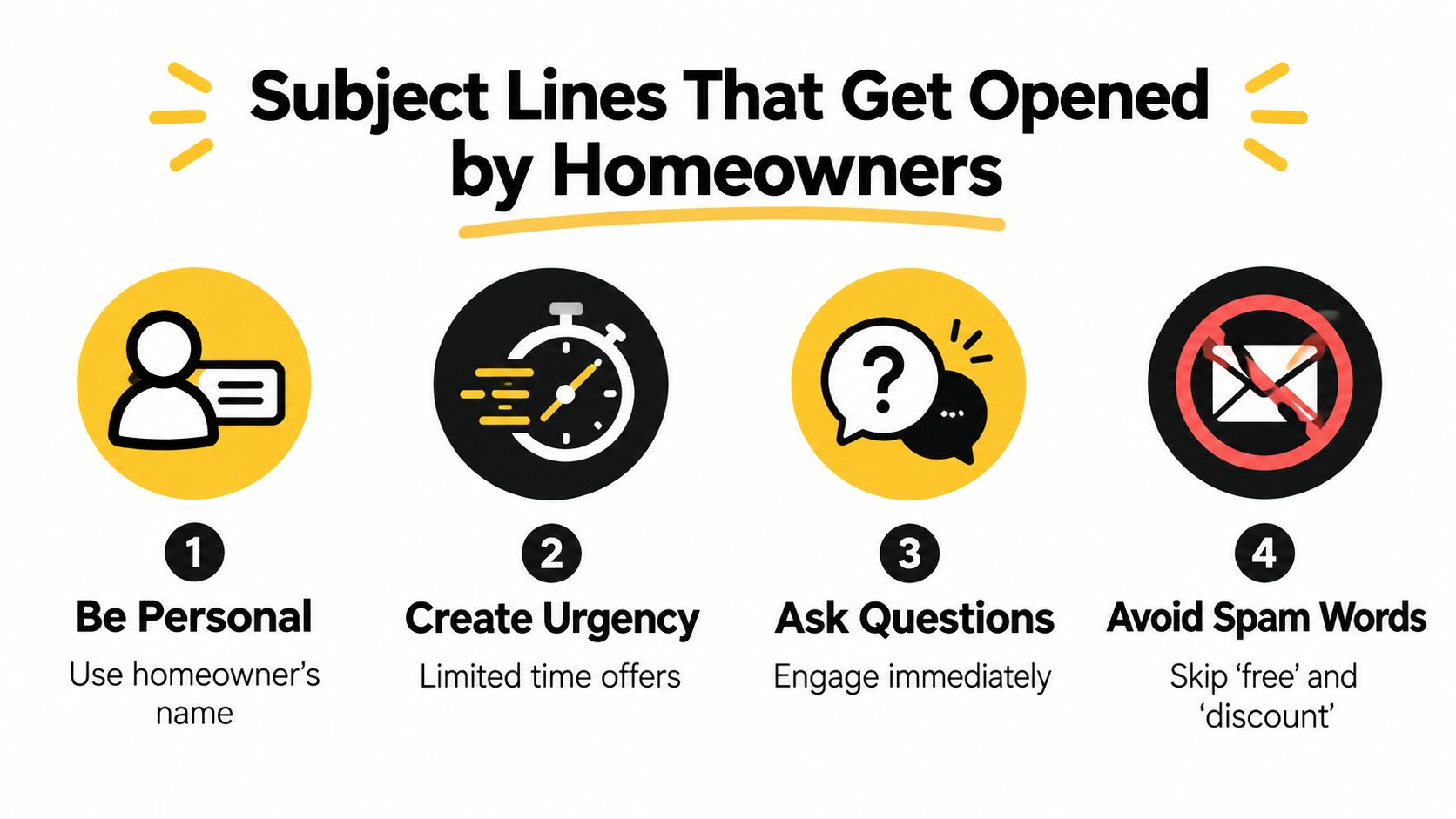
Homeowners scan crowded inboxes quickly. A subject line earns attention by naming the service, the problem, or the timing without sounding like a promotion. Contractors need the same email anatomy used by SaaS and e-commerce teams, adjusted for one goal: getting a homeowner to reply or book an appointment.
Use this four-part process.
Start with the job and the situation
Put the service or problem near the beginning. An HVAC company can write “{{FirstName}}, furnace check for {{Address}}”. A plumber can ask “Is that leak getting worse?” A roofer can use “Roof damage after the storm?” An electrical contractor might write “A safer fix for your panel”.
Each line gives the homeowner a reason to open while staying within what your crew can provide. Remove vague phrases such as “Special Offer Inside” and “Important Update.” They hide the purpose and make the recipient do extra work before deciding whether the message matters.
Add urgency without pressure
Urgency should come from a real condition, service window, or likely consequence. Use “Before the next cold snap” for furnace maintenance, “Before water reaches the ceiling” for a plumbing follow-up, or “Schedule your roof inspection” after a storm. The wording should prompt action without implying danger you cannot support.
Keep the subject between 30 and 50 characters when possible. Lines over 60 characters may be cut off on mobile and can read like promotions. The contractor subject-line guide covers additional examples for service businesses.
Make the preheader finish the thought
The preheader should add the detail the subject cannot fit. For “{{FirstName}}, furnace check for {{Address}}”, use “We have appointments available this week in your area.” For “Roof damage after the storm?”, use “Send us a few photos and we’ll explain the next step.”
Preheader text can range from 40 to 130 characters, while mobile inboxes may display only the first 30 to 55 characters, according to this mobile preheader guidance. Put the useful detail first. Never use the preheader to repeat the subject.
Match the formula to your trade
- HVAC: Service plus timing. “Ready for your furnace tune-up?”
- Plumbing: Problem plus consequence. “Is your water heater leaking?”
- Roofing: Event plus inspection. “Need a roof check after the storm?”
- Electrical: Safety plus action. “Concerned about your electrical panel?”
Test one variable at a time. Hold the offer and audience steady while changing the subject. Change the CTA in a later send. That separation gives you a clearer read on what earns replies from homeowners.
Use this video as a visual reference while your office manager builds subject-line variations:
Invisible Technical Layers That Control Deliverability
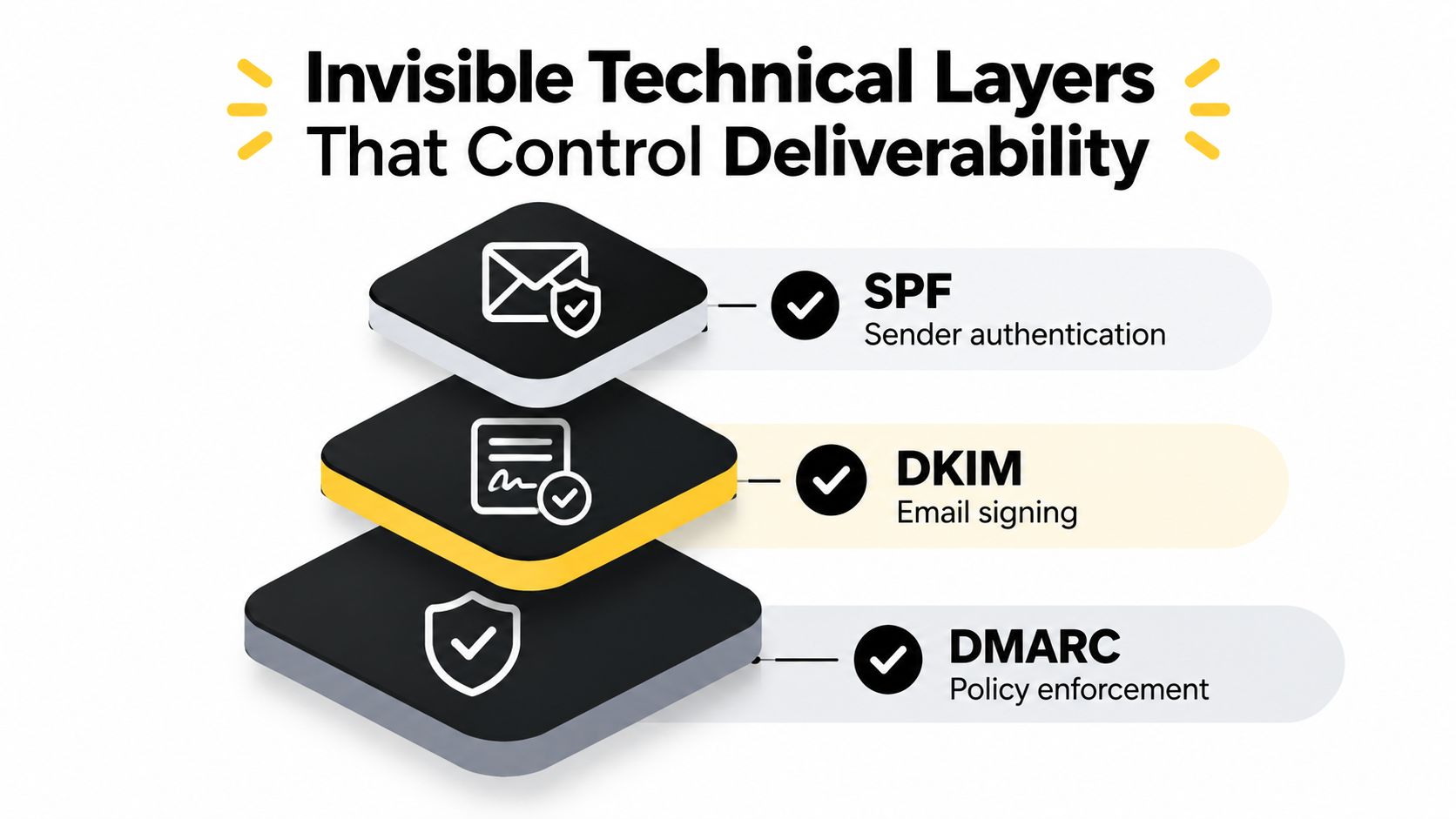
A polished message can still land in spam when the sending domain doesn’t prove who authorized it. The anatomy of an email has an address layer, a header layer, and a visible message layer. The technical headers travel behind the scenes, carrying routing and authentication information that mailbox providers use to evaluate the sender.
SPF authorizes the sender
SPF, or Sender Policy Framework, identifies the services allowed to send email for your domain. If your office sends from one platform, your marketing agency sends from another, and your CRM sends follow-ups from a third, each authorized service needs to be accounted for by whoever manages your domain records.
SPF doesn’t make your message persuasive. It supports the claim that the sending system has permission to send on your behalf. Ask your email administrator or marketing platform to verify the record rather than guessing at a setup.
DKIM signs the message
DKIM, or DomainKeys Identified Mail, adds a digital signature to outgoing email. The receiving mailbox checks that signature against the public information associated with your domain. A valid signature helps show that the message wasn’t altered between sending and receipt.
Your homeowner never sees DKIM in the body. Your deliverability can still suffer when the signature fails, especially if your team changes sending platforms without updating the authentication setup.
DMARC sets the response
DMARC, or Domain-based Message Authentication, Reporting, and Conformance, tells receiving providers how to handle messages that fail authentication checks. It also helps domain owners receive reports about those failures.
SPF, DKIM, and DMARC serve different functions. SPF deals with authorization, DKIM deals with message signing, and DMARC applies policy. Together they protect the relationship between your domain and your email.
A beautiful email that never reaches the inbox has no sales value. Check authentication before rewriting the copy.
Give your technical owner a short inspection list:
- Confirm sending services: List every platform that sends from your business domain.
- Review authentication status: Use the platform’s verification tools and check for failures.
- Protect alignment: Make the visible sender domain, authenticated domain, and reply address work together.
- Monitor changes: Recheck the setup when you add a CRM, newsletter system, or automation tool.
Don’t stuff technical details into the body of a homeowner email. Keep the infrastructure clean, then use the visible anatomy to earn the appointment.
Complete Email Templates for Each Trade
A useful template gives every element one job. Replace the fields, keep the message focused, and send from a recognizable person at your company. Don’t combine a seasonal offer, referral request, warranty reminder, and emergency alert in one message.
HVAC tune-up
Subject: {{FirstName}}, ready for a furnace check?
Preheader: Book a visit before your system has to work harder.
Body: Hi {{FirstName}}, if your furnace hasn’t been checked recently, our technician can inspect the system, identify worn components, and explain any repair before the next cold spell. We serve homeowners in {{ServiceArea}} and can arrange a convenient appointment for {{Address}}.
CTA: Book a furnace inspection
Footer: {{CompanyName}}, {{Phone}}, {{Address}}. Unsubscribe.
Plumbing follow-up
Subject: Is that leak still active?
Preheader: Send a photo and we’ll help you choose the next step.
Body: Hi {{FirstName}}, a small leak can become a larger repair when water keeps reaching cabinets, flooring, or walls. Reply to this email with a photo, or choose a service time and we’ll send a plumber to {{Address}}.
CTA: Schedule plumbing service
Footer: {{CompanyName}}, {{Phone}}, {{ServiceArea}}. Unsubscribe.
Roofing inspection
Subject: Roof damage after the storm?
Preheader: Get a clear inspection before damage spreads.
Body: Hi {{FirstName}}, if wind or hail passed through your area, our roofing team can inspect visible damage, document what we find, and explain repair options. You don’t need to diagnose the roof from a ladder. Choose a time and we’ll take a closer look at {{Address}}.
CTA: Request a roof inspection
Footer: {{CompanyName}}, {{Phone}}, license information, mailing address. Unsubscribe.
Electrical safety visit
Subject: Concerned about your electrical panel?
Preheader: We’ll inspect the panel and explain what needs attention.
Body: Hi {{FirstName}}, flickering lights, warm outlets, or repeated breaker trips deserve a professional inspection. Our electrician can assess the panel at {{Address}} and separate immediate safety concerns from work that can wait.
CTA: Book an electrical inspection
Footer: {{CompanyName}}, {{Phone}}, license information, mailing address. Unsubscribe.
Emergency service
Subject: Need a plumber tonight?
Preheader: Call our dispatch team for the fastest available response.
Body: Hi {{FirstName}}, if water is actively damaging your home, call {{Phone}} now and shut off the main water supply if it’s safe to do so. Our dispatch team will confirm availability and tell you what to expect before a technician arrives.
CTA: Call emergency dispatch
Footer: {{CompanyName}}, {{Phone}}, service area, mailing address. Unsubscribe.
A complete collection of messages for sales follow-up is available in these email templates for sales. Before sending, check that every dynamic field populates correctly, every button opens the intended booking page, and the reply address reaches a person who can respond.
Tracking Your Emails with Pipeline On
Untracked email gives your office guesses instead of evidence. A homeowner may open the message but never reach the booking page, or click the link and receive no response because the inquiry went to the wrong inbox. Without activity data, those failures look like a weak subject line or an unappealing offer.
Pipeline On adds tracking to contractor email workflows. It can identify website visitors, show engagement, and route follow-up through connected systems. That gives your team a clearer view of what happened after the email was sent, from the first visit to the next service inquiry.
Compare the two workflows
An untracked email leaves the office waiting. Staff cannot easily confirm whether a homeowner ignored the subject, read the offer, clicked the booking page, or returned to a service page later.
A tracked workflow connects each signal to a practical next action:
- Opened but didn’t click: Review the CTA, then send a short follow-up focused on one service.
- Clicked a booking page: Contact the homeowner while the request is still active.
- Returned to a service page: Prioritize a personal call or direct reply.
- No engagement: Check the address, timing, subject, and service relevance before trying again.
These signals do not fix a weak email. They show where the email’s anatomy succeeded or failed and help your office respond accordingly.
Pipeline On integration overview
| Feature | What It Does | Why It Matters |
|---|---|---|
| Visitor identification | Connects anonymous website activity with homeowner records | Gives your team a contactable profile |
| CRM syncing | Pushes profiles into systems such as ServiceTitan, Housecall Pro, Jobber, HubSpot, and Pipedrive | Keeps follow-up in the workflow your crew already uses |
| Email and SMS sequences | Triggers follow-up after engagement or identification | Reduces delays between interest and contact |
| Hot Pages and Hot Leads | Highlights valuable pages and engaged prospects | Helps your office prioritize outreach |
| Alerts and Zapier | Sends real-time notifications and connects other tools | Makes lead routing easier to manage |
Map fields such as first name, address, service interest, phone number, and source before launching an automation. Test every field with a real message. A missing address or incorrect phone number can send a promising request to the wrong person.
Keep the first message specific and give the homeowner a clear reply path. Let a staff member take over when the conversation becomes urgent, such as an active leak, failed heating system, or electrical concern. Automation should shorten the delay, not replace judgment.
Use this lead-source tracking guide to connect campaign activity with the source that produced it. Your reports should show which message, service page, and follow-up action contributed to the booking. That record helps you keep the email structure that produces replies and remove steps that create dead ends.
Your Email Anatomy Action Plan
Audit one active campaign today. Read it on a phone, with images blocked, and as a homeowner who has never met your company.
- Subject: Name the problem or service and keep the line concise.
- Preheader: Add a new detail instead of repeating the subject.
- Body: Put the homeowner’s concern before your company history.
- CTA: Ask for one action, such as booking, calling, or replying with a photo.
- Footer: Check your company identity, contact details, mailing address, and unsubscribe control.
- Technical setup: Confirm SPF, DKIM, and DMARC with the person responsible for your domain.
- Follow-up: Decide who responds when a homeowner replies or shows buying intent.
For the next month, test deliberately. Start with several subject-line variations for one service, then keep the strongest structure while testing the preheader. After that, test the CTA destination and follow-up timing. Record replies and booked appointments, not just opens.
Your nurture sequence also needs a stopping rule. Pause promotional follow-ups when a homeowner books, asks not to be contacted, or starts a live conversation. Continue useful service communication only when it fits the customer’s situation.
Every email without clear anatomy creates another chance for a homeowner to postpone, ignore, or misunderstand your offer. Your crew doesn’t need more leads if your existing conversations are leaking through weak subjects, vague CTAs, and untracked follow-up. Build every message to make the next action obvious.
Pipeline On helps home service contractors identify anonymous website visitors, connect them with existing CRM workflows, and trigger targeted email follow-up based on engagement. Visit Pipeline On to connect your email anatomy with the homeowner activity that leads to booked appointments.
Written by
Pipeline Research Team